
Connects Google Analytics with your WordPress site. Displays stats to help you understand your users and site content on a whole new level!
- Installs
- 200,000+
- Rating
- 2.5 (1.5K)
- Updated
- 45 days ago

Use Google Analytics on your WordPress site without touching any code, and view visitor reports right in your WordPress admin dashboard!
| Last updated | September 24, 2026Updated in the last 3 months |
|---|---|
| Tested up to | WordPress 7.1.4Covers WordPress 7.1.4, the current release |
| Needs WordPress | 5.5 or newer |
| Needs PHP | Not stated |
| First published | June 15, 2009 |
| Support, last two months | 0 of 1 threads resolved (0%) |
3.6 / 5 from 138 reviews
| 5 stars | 85 |
|---|---|
| 4 stars | 6 |
| 3 stars | 1 |
| 2 stars | 1 |
| 1 star | 45 |
Monitor, analyze, and measure visitor engagement for your site directly from your WordPress dashboard with our Google Analytics plugin. With our Google Analytics dashboard, you’ll be able to conveniently access Google Analytics reports in the same interface you already use every day to write and manage your posts.
Unlike other plugins, there are no monthly fees or paid upgrades for this plugin. All of the features are 100% free.
GOOGLE ANALYTICS SETUP
Get started in less than 10 minutes. Installation is quick and easy, no developers required.
Simply download the plugin, log into Google, select your Google Analytics 4 (GA4) property, and it will automatically include the appropriate tracking code for you.
GOOGLE ANALYTICS DASHBOARD
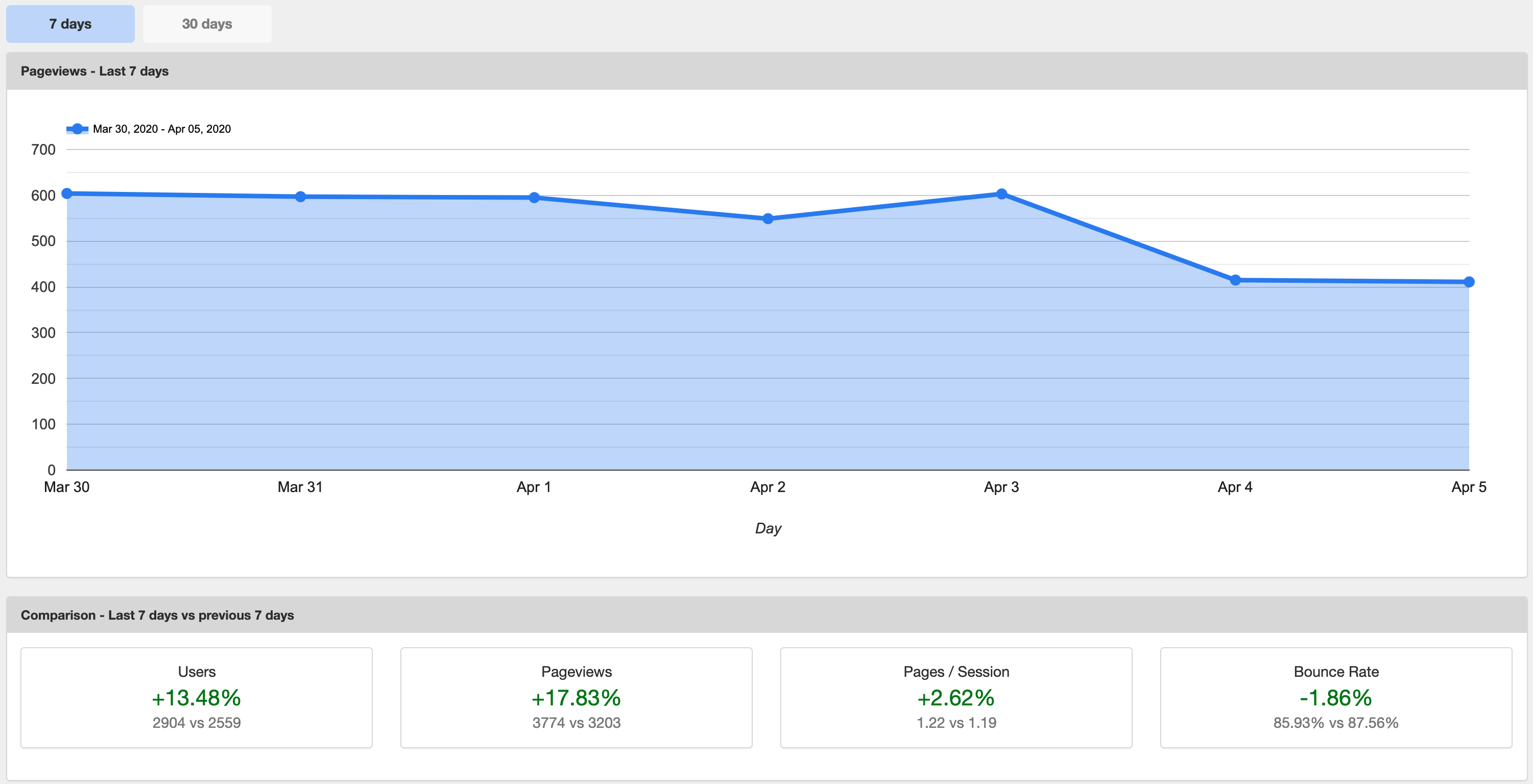
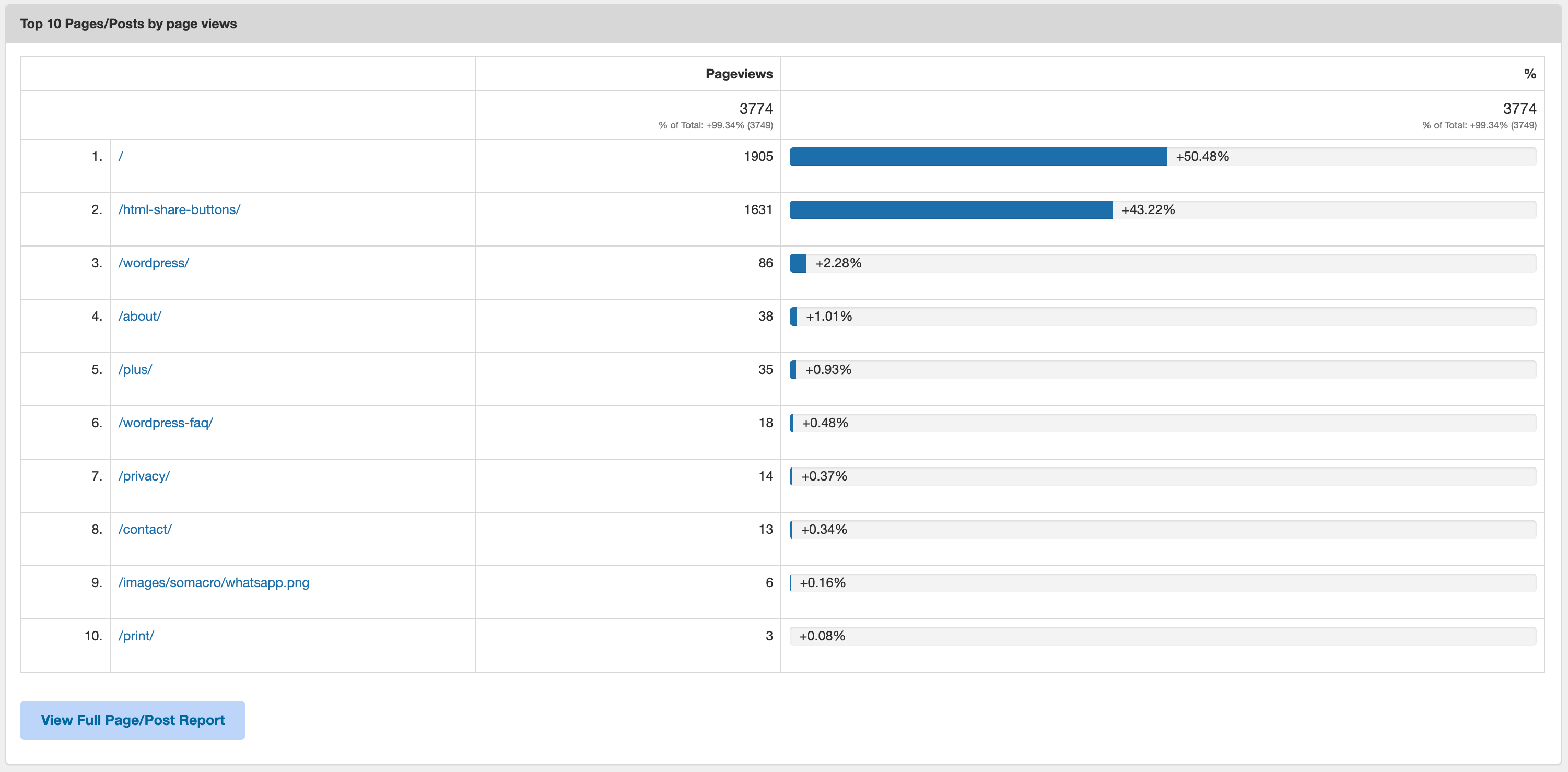
Start making data-driven decisions with real time stats including:
The opening of the plugin's own description. The full text, installation notes and changelog are on its WordPress.org page.
Google Analytics is a powerful tool for monitoring website performance. With Google Analytics, you’ll gain insights such as what geographic areas your visitors are coming from, what channels led them to your website (paid search, social, organic, etc.), what devices they use to browse your site, and what other websites are sending visitors to your site.
Using Google Analytics on your WordPress website is a must for monitoring your website’s traffic and gaining valuable visitor insights. There are two ways to use Google Analytics on WordPress:
Google Analytics tracking code is a block of JavaScript code that executes Google Analytics tracking when a visitor loads a page on your website. The script that triggers these events must be loaded on every page in order for Google Analytics tracking to work.
There are many ways to leverage Google Analytics to improve your WordPress website’s SEO. SEO, or search engine optimization, is the practice of tracking and analyzing website data to improve organic traffic. But tracking traffic and other website metrics alone doesn’t magically improve your SEO.
When the General Data Protection Regulation (GDPR) was first introduced, website publishers everywhere were fraught with anxiety about what it would mean for their businesses and overwhelmed with the steps they needed to take to ensure compliance.
Google Analytics 4 (GA4) is the current version of Google’s analytics platform and the only version supported going forward. GA4 property IDs look like G-XXXXXXX. GA4 lets you track both websites and apps under one account, adds many new reporting features, and provides deeper insights into how users interact with your content.


Connects Google Analytics with your WordPress site. Displays stats to help you understand your users and site content on a whole new level!
The best free Google Analytics plugin for WordPress. See how visitors find and use your website so you can grow your business with powerful analytics.
Cookieless, privacy-friendly WordPress analytics. GDPR/CCPA compliant visitor data and clear graphs, with no data sharing.

#149 by installs
Adds Google Analytics tracking code to your WordPress site. Supports many tracking features.
Simple, lightweight WordPress analytics with privacy-friendly visitor tracking. Cookieless and GDPR-ready. Setup in seconds, no cookie banner needed.

#378 by installs
A simple, yet powerful WordPress analytics plugin that gives you privacy-friendly stats to grow your website. A Google Analytics alternative.
Read from the WordPress.org plugin API on , when WordPress 7.1.4 was the current release. WordPress.org rounds active installs into buckets. These are the directory's figures, not my verdict, and I haven't tested this plugin.


