
#286 by installs
Post Views Counter
Count and display post views, track site-wide visits, and see what content works – inside WordPress. Fast, easy to use and privacy-first.
- Installs
- 100,000+
- Rating
- 4.9 (1.2K)
- Updated
- 8 days ago

Visitor statistics for WordPress with focus on data protection, transparency and clarity. Perfect as a widget in your WordPress Dashboard.
| Last updated | September 20, 2026Updated in the last 3 months |
|---|---|
| Tested up to | WordPress 7.1.4Covers WordPress 7.1.4, the current release |
| Needs WordPress | 5.1 or newer |
| Needs PHP | 7.4 or newer |
| First published | March 16, 2011 |
| Support, last two months | 0 of 1 threads resolved (0%) |
4.8 / 5 from 51 reviews
| 5 stars | 45 |
|---|---|
| 4 stars | 4 |
| 3 stars | 0 |
| 2 stars | 0 |
| 1 star | 2 |
Statify provides a straightforward and compact access to the number of site views. It is privacy-friendly as it uses neither cookies nor a third party.
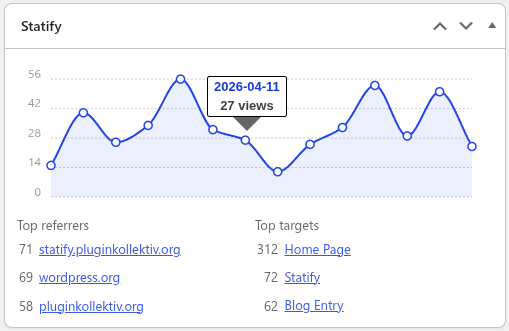
An interactive chart is followed by lists of the most common reference sources and target pages. The period of statistics and length of lists can be set directly in the dashboard widget.
Data Privacy
In direct comparison to statistics services such as Google Analytics, WordPress.com Stats and Matomo (Piwik) Statify doesn’t process and store personal data as e.g. IP addresses – Statify counts site views, not visitors.
Absolute privacy compliance coupled with transparent procedures: A locally in WordPress created database table consists of only four fields (ID, date, source, target) and can be viewed at any time, cleaned up and cleared by the administrator.
Due to this tracking approach, Statify is 100% compliant with GDPR and serves as an lightweight alternative to other tracking services.
Display of the widget
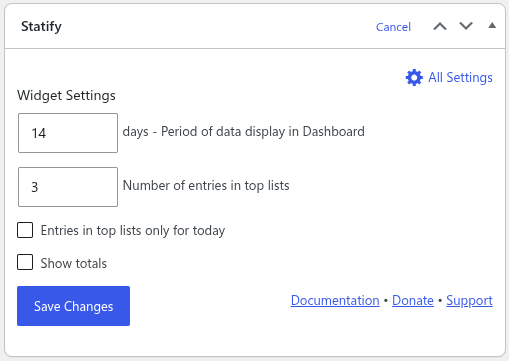
The plugin configuration can be changed directly in the Statify Widget on the dashboard by clicking the Configure link.
The amount of links shown in the Statify Widget can be set as well as the option to only count views from today. Of course, older entries are not deleted when changing this setting.
The statistics for the dashboard widget are cached for four minutes.
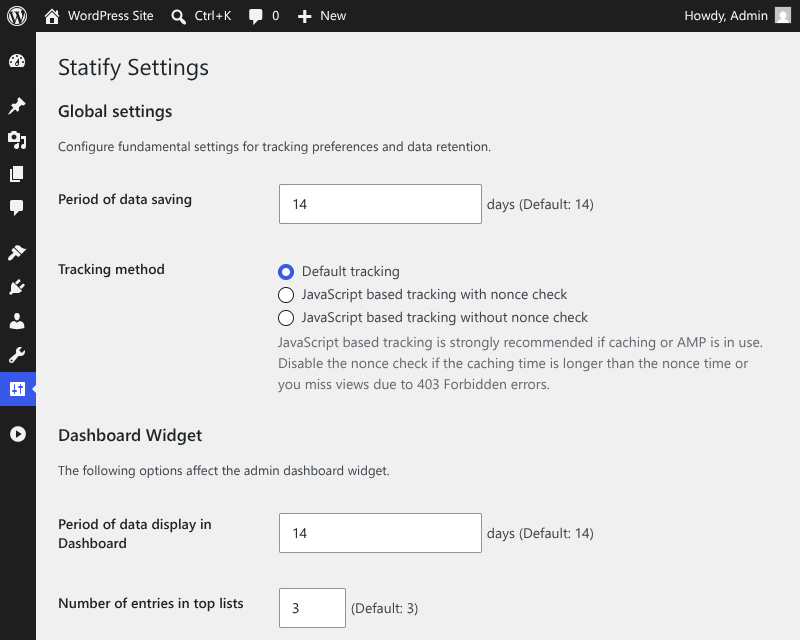
Period of data saving
The opening of the plugin's own description. The full text, installation notes and changelog are on its WordPress.org page.
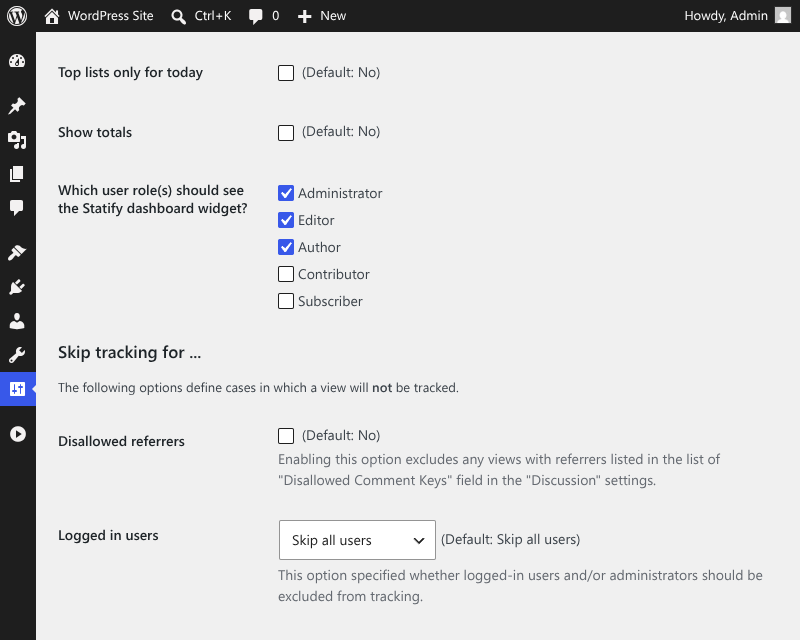
Statify does not count the following views:
This behavior can be modified with the statify__skip_tracking hook.
Statify determines the source of a visit from the Referer request header (or, with JavaScript tracking enabled, from document.referrer).
The browser only sends this information when the originating site allows it via the Referrer-Policy header, so the originating site controls whether Statify receives a source at all.
A few common reasons why a Referer is missing:
Some plugin users want to capture additional visitor data, e.g. name of the device and resolution.
Statify counts exclusively page views and no visitors, the desired data acquisition is not a question.
Per default only administrators can see the widget. This can be changed with the statify__user_can_see_stats hook.
Example:
add_filter( 'statify__user_can_see_stats', '__return_true' );
has to be added to the theme’s functions.php and adapted to your needs. This example would allow all users to see the widget.
Editing the configuration is still limited to users with edit_dashboard capability.
The conditions for tracking views can be customized according to page type and user capabilities by using the hook statify__skip_tracking.
Example:
add_filter( 'statify__skip_tracking', function() { if ( condition ) { return true; }
return false; } );
has to be added to the theme’s functions.php. The condition has modified such that the method returns true if and only if the view should be ignored.
#286 by installs
Count and display post views, track site-wide visits, and see what content works – inside WordPress. Fast, easy to use and privacy-first.

#610 by installs
Privacy-friendly and lightweight Google Analytics alternative for WordPress sites. No cookies, just insights.

#651 by installs
Adds Matomo (former Piwik) statistics to your WordPress dashboard and is also able to add the Matomo Tracking Code to your blog.
Cookieless, privacy-friendly WordPress analytics. GDPR/CCPA compliant visitor data and clear graphs, with no data sharing.

#149 by installs
Adds Google Analytics tracking code to your WordPress site. Supports many tracking features.
Simple, lightweight WordPress analytics with privacy-friendly visitor tracking. Cookieless and GDPR-ready. Setup in seconds, no cookie banner needed.
Read from the WordPress.org plugin API on , when WordPress 7.1.4 was the current release. WordPress.org rounds active installs into buckets. These are the directory's figures, not my verdict, and I haven't tested this plugin. The author takes donations at their donate page.

