
Make email delivery easy for WordPress. Connect with SMTP, Gmail, Brevo, SendGrid, Amazon SES + more, with powerful WordPress SMTP Email plugin.
- Installs
- 4+ million
- Rating
- 4.8 (5.2K)
- Updated
- 11 days ago

Configure a SMTP server to send email from your WordPress site. Configure the wp_mail() function to use SMTP instead of the PHP mail() function.
| Last updated | September 7, 2026Updated in the last 3 months |
|---|---|
| Tested up to | WordPress 7.1.4Covers WordPress 7.1.4, the current release |
| Needs WordPress | 7.1 or newer |
| Needs PHP | Not stated |
| First published | December 20, 2015 |
| Support, last two months | 0 of 1 threads resolved (0%) |
4.6 / 5 from 67 reviews
| 5 stars | 59 |
|---|---|
| 4 stars | 0 |
| 3 stars | 0 |
| 2 stars | 2 |
| 1 star | 6 |
SMTP Mailer plugin allows you to configure a mail server which handles all outgoing email from your website. It takes control of the wp_mail function and use SMTP instead.
SMTP Mailer Add-ons
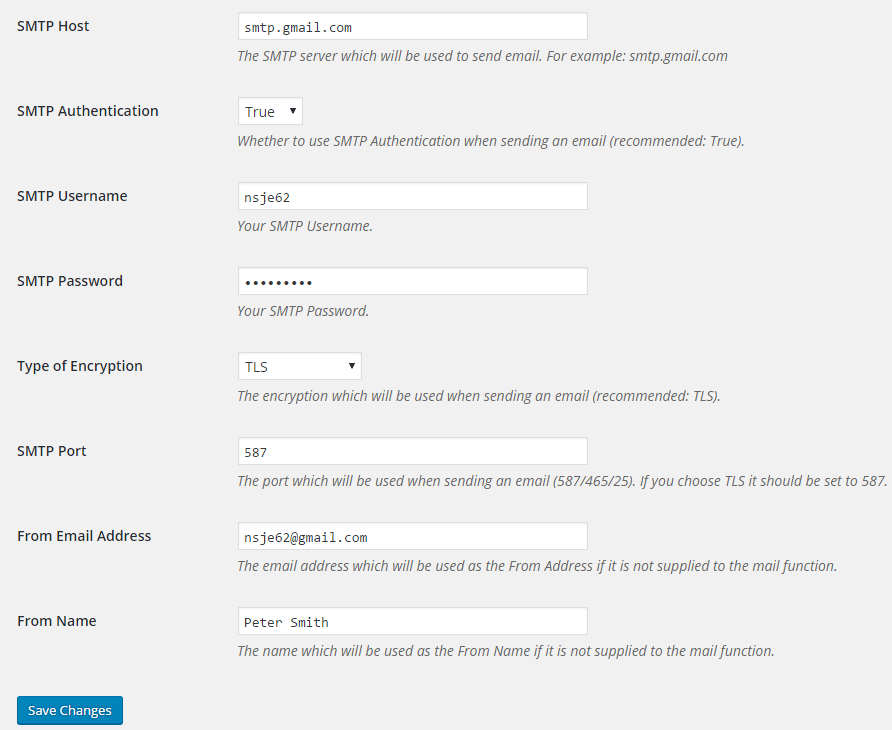
SMTP Mailer Settings
The opening of the plugin's own description. The full text, installation notes and changelog are on its WordPress.org page.
Make email delivery easy for WordPress. Connect with SMTP, Gmail, Brevo, SendGrid, Amazon SES + more, with powerful WordPress SMTP Email plugin.

Make SMTP email sending and delivery easy. Configure Gmail SMTP, Outlook, Brevo, SendGrid, Mailgun, SendLayer or connect to any SMTP server.

#164 by installs
Log, view, and resend all emails sent from your WordPress site. Great for resolving email sending issues or keeping a copy for auditing.
Effortlessly manage transactional emails with Email Deliverability. High deliverability, logs and statistics, and no SMTP plugins needed.

SureMail – SMTP and Email Logs Plugin with Amazon SES, Postmark, and Other Providers

#466 by installs
Check & Log email allows you to test if your website is correctly sending emails . Overriding of email headers and carbon copying to another address.
Read from the WordPress.org plugin API on , when WordPress 7.1.4 was the current release. WordPress.org rounds active installs into buckets. These are the directory's figures, not my verdict, and I haven't tested this plugin. The author takes donations at their donate page.
