
#314 by installs
WPS Limit Login
WPS Limit login limit connection attempts by IP address
- Installs
- 100,000+
- Rating
- 4.9 (83)
- Updated
- 43 days ago

Limit rate of login attempts, including by way of cookies, for each IP. Fully customizable.
| Last updated | April 4, 2023Not updated for over a year |
|---|---|
| Tested up to | WordPress 6.2.15Older than WordPress 7.1.4, the current release |
| Needs WordPress | 2.8 or newer |
| Needs PHP | Not stated |
| First published | January 15, 2009 |
| Support, last two months | No threads opened |
4.6 / 5 from 202 reviews
| 5 stars | 170 |
|---|---|
| 4 stars | 13 |
| 3 stars | 3 |
| 2 stars | 4 |
| 1 star | 12 |
Limit the number of login attempts possible both through normal login as well as using auth cookies.
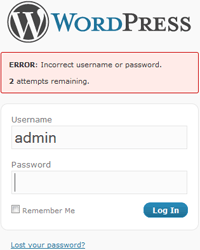
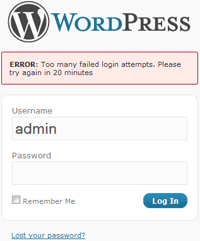
By default WordPress allows unlimited login attempts either through the login page or by sending special cookies. This allows passwords (or hashes) to be brute-force cracked with relative ease.
Limit Login Attempts blocks an Internet address from making further attempts after a specified limit on retries is reached, making a brute-force attack difficult or impossible.
Features
Translations: Bulgarian, Brazilian Portuguese, Catalan, Chinese (Traditional), Czech, Dutch, Finnish, French, German, Hungarian, Norwegian, Persian, Romanian, Russian, Spanish, Swedish, Turkish
Plugin uses standard actions and filters only.
The opening of the plugin's own description. The full text, installation notes and changelog are on its WordPress.org page.
This is very much by design. Otherwise you could brute force the “admin” password by logging in as your own user every 4th attempt.
A reverse proxy is a server in between the site and the Internet (perhaps handling caching or load-balancing). This makes getting the correct client IP to block slightly more complicated.
The option default to NOT being behind a proxy — which should be by far the common case.
You probably are not or you would know. We show a pretty good guess on the option page. Set the option using this unless you are sure you know better.
First please consider if you really need this. Generally speaking it is not a good idea to have exceptions to your security policies.
That said, there is now a filter which allows you to do it: “limit_login_whitelist_ip”.
Example:
function my_ip_whitelist($allow, $ip) {
return ($ip == ‘my-ip’) ? true : $allow;
}
add_filter(‘limit_login_whitelist_ip’, ‘my_ip_whitelist’, 10, 2);
Either wait, or:
If you know how to edit / add to PHP files you can use the IP whitelist functionality described above. You should then use the “Restore Lockouts” button on the plugin settings page and remove the whitelist function again.
If you have ftp / ssh access to the site rename the file “wp-content/plugins/limit-login-attempts/limit-login-attempts.php” to deactivate the plugin.
Security fixes.
#314 by installs
WPS Limit login limit connection attempts by IP address

#46 by installs
Loginizer is a WordPress security plugin which helps you fight against bruteforce attacks.

#51 by installs
Secure your WordPress site from brute-force attacks, threats, malware, and bots. Free to use and easy to set up.

#312 by installs
Enable Two-Factor Authentication (2FA) using time-based one-time passwords (TOTP), email, and backup verification codes.

#401 by installs
Hide My WP Ghost is a WordPress security plugin that hides WP paths and protects your site with Path Security, Firewall, Brute Force Protection, 2FA

#628 by installs
WP fail2ban uses fail2ban to protect your WordPress site.
Read from the WordPress.org plugin API on , when WordPress 7.1.4 was the current release. WordPress.org rounds active installs into buckets. These are the directory's figures, not my verdict, and I haven't tested this plugin.