
Firewall, Malware Scanner, Two Factor Auth, and Comprehensive Security Features, powered by our 24-hour team. Make security a priority with Wordfence.
- Installs
- 5+ million
- Rating
- 4.7 (5K)
- Updated
- 31 days ago

This Anti-Malware scanner searches for Malware, Viruses, and other security threats and vulnerabilities on your server and it helps you fix them.
| Last updated | October 27, 2026Updated in the last 3 months |
|---|---|
| Tested up to | WordPress 7.1.4Covers WordPress 7.1.4, the current release |
| Needs WordPress | 3.3 or newer |
| Needs PHP | 5.6 or newer |
| First published | March 27, 2012 |
| Support, last two months | 1 of 1 threads resolved (100%) |
4.9 / 5 from 783 reviews
| 5 stars | 758 |
|---|---|
| 4 stars | 19 |
| 3 stars | 0 |
| 2 stars | 1 |
| 1 star | 5 |
Features:
Premium Features:
Register this plugin at GOTMLS.NET and get access to new definitions of “Known Threats” and added features like Automatic Removal, plus patches for specific security vulnerabilities like old versions of timthumb. Updated definition files can be downloaded automatically within the admin once your Key is registered. Otherwise, this plugin just scans for “Potential Threats” and leaves it up to you to identify and remove the malicious ones.
The opening of the plugin's own description. The full text, installation notes and changelog are on its WordPress.org page.
If you register on GOTMLS.NET you will have access to download definitions of New Threats and added features like automatic removal of “Known Threats” and patches for specific security issues like old versions of timthumb and brute-force attacks on wp-login.php.
Easy, if you have installed and activated my this Anti-Malware plugin on your site then it will automatically block attempts to exploit the Revolution Slider vulnerability.
The WordPress Login page is susceptible to a brute-force attack (just like any other login page). These types of attacks are becoming more prevalent these days and can sometimes cause your server to become slow or unresponsive, even if the attacks do not succeed in gaining access to your site. This plugin can apply a patch that will block access to the WordPress Login page whenever this type of attack is detected.
Many of these files may use eval and other powerful PHP function for perfectly legitimate reasons and removing that code from the files would likely cripple or even break your site so I have only enabled the Auto remove feature for “Know Threats”.
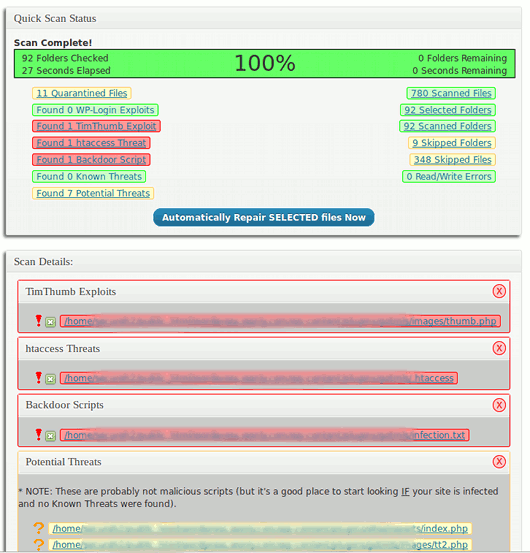
Click on the linked filename to examine it, then click each numbered link above the file content box to highlight the suspicious code. If you cannot tell whether or not the code is malicious just leave it alone or ask someone else to look at it for you.
First just leave it for a while. If there are a lot of files on your server it could take quite a while and could sometimes appear to not be moving along at all even if it really is working. If it still seems stuck after a while then try running the scan again, be sure you try both the Complete Scan and the Quick scan.

Firewall, Malware Scanner, Two Factor Auth, and Comprehensive Security Features, powered by our 24-hour team. Make security a priority with Wordfence.

WordPress login security with brute force protection, Two-factor authentication (2FA/MFA), firewall, IP/country blocking, and login monitoring

#401 by installs
Hide My WP Ghost is a WordPress security plugin that hides WP paths and protects your site with Path Security, Firewall, Brute Force Protection, 2FA

#51 by installs
Secure your WordPress site from brute-force attacks, threats, malware, and bots. Free to use and easy to set up.

#57 by installs
Protect your WordPress site with All-In-One Security (AIOS): easy-to-use login security, a powerful firewall, and much more.
The Sucuri WordPress Security plugin is a security toolset for security integrity monitoring, malware detection and security hardening.
Read from the WordPress.org plugin API on , when WordPress 7.1.4 was the current release. WordPress.org rounds active installs into buckets. These are the directory's figures, not my verdict, and I haven't tested this plugin. The author takes donations at their donate page.
