
#264 by installs
Widget Importer & Exporter
Import and export your widgets.
- Installs
- 200,000+
- Rating
- 4.7 (117)
- Updated
- 16 days ago

Include all relevant attachments in your export.
| Last updated | October 20, 2026Updated in the last 3 months |
|---|---|
| Tested up to | WordPress 7.1.4Covers WordPress 7.1.4, the current release |
| Needs WordPress | 4.5 or newer |
| Needs PHP | 7.0 or newer |
| First published | October 15, 2016 |
| Support, last two months | No threads opened |
4.5 / 5 from 93 reviews
| 5 stars | 78 |
|---|---|
| 4 stars | 2 |
| 3 stars | 3 |
| 2 stars | 0 |
| 1 star | 10 |
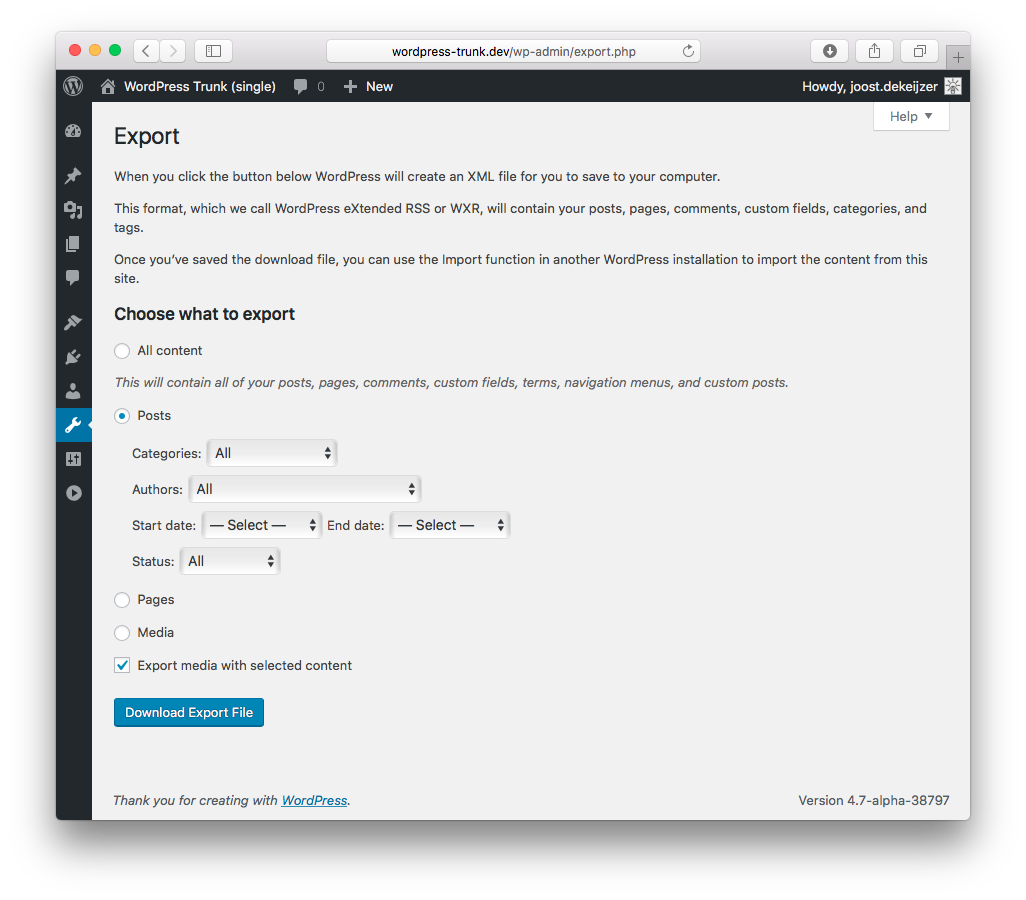
When selecting one post type in the WordPress export screen, by default the linked media (attachments) are not included.
This plugin adds an “Export media with selected content” option. When checked, the plugin tries to find featured images and included media in the post_content, adding them to the export file.
The opening of the plugin's own description. The full text, installation notes and changelog are on its WordPress.org page.
This plugin hooks into the WordPress export routine and tries to find images related to the post (page, etc.). It does so by looking for “attached” (uploaded to) media and it searches the body of the post (the post_content) for image files.
It’s possible that themes or plugins use different ways of referencing media to your post. This plugin will not find those.
In eg. the Gutenberg gallery block, when you select an image size (for the gallery) the images with that size are ‘hard-coded’ in the html.
The WordPress import routine downloads the original image of the ‘export site’ and re-creates the configured image sizes. When your configured image sizes differ, you might end up with broken galleries.
Yes! The plugin features two filter hooks:
* export_query
* export_query_media_ids
Please browse the code to see what they do, I guess export_query_media_ids is easiest to use as it requires you to just add more attachment IDs to an array.
#264 by installs
Import and export your widgets.

#309 by installs
Easily export or import your WordPress customizer settings!

#326 by installs
Export WooCommerce orders to Excel, CSV, XML, JSON, PDF and HTML. Best free order export plugin for WooCommerce.
Easily export data from any post type, custom field, or taxonomy to a CSV, XML, or Excel file of any custom format. Supports WooCommerce products, ord …

#712 by installs
Export post, page and custom post type data to CSV or JSON, and snapshot your site to detect added, removed or changed content.

#861 by installs
Complete Import & Export solution for Posts, Pages, Custom Posts, Users, Taxonomies, Comments, and more.
Read from the WordPress.org plugin API on , when WordPress 7.1.4 was the current release. WordPress.org rounds active installs into buckets. These are the directory's figures, not my verdict, and I haven't tested this plugin.
