
#264 by installs
Widget Importer & Exporter
Import and export your widgets.
- Installs
- 200,000+
- Rating
- 4.7 (117)
- Updated
- 16 days ago

Easily export or import your WordPress customizer settings!
| Last updated | June 16, 2026Updated in the last year |
|---|---|
| Tested up to | WordPress 7.0.8Older than WordPress 7.1.4, the current release |
| Needs WordPress | 3.6 or newer |
| Needs PHP | Not stated |
| First published | December 20, 2014 |
| Support, last two months | No threads opened |
4.8 / 5 from 115 reviews
| 5 stars | 109 |
|---|---|
| 4 stars | 1 |
| 3 stars | 0 |
| 2 stars | 0 |
| 1 star | 5 |
Customizer Export/Import
The Customizer Export/Import plugin allows you to export or import your WordPress customizer settings from directly within the customizer interface! If your theme makes use of the WordPress customizer for its settings, this plugin is for you!
Please visit our blog for more info on the Customizer Export/Import plugin.
New! Export Options
The Customizer Export/Import plugin previously only exported options saved as theme mods using the get_theme_mods function, but that is no more! The Customizer Export/Import plugin now exports settings saved as options as well!
How It Works
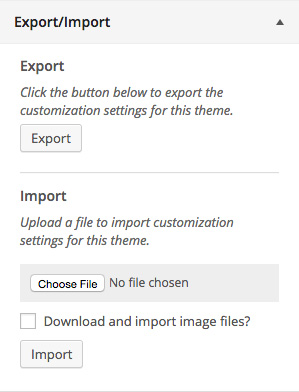
Exporting customizer settings is easy. Click the export button from within the customizer and a file will automatically begin downloading with your settings. Export files are named after your theme and can only be used to import settings for the theme or child theme that they came from. Export files contain a serialized dump of mods retrieved using the get_theme_mods function or customizer settings saved as options.
Importing customizer settings is just as easy. Choose the export file you would like to import, select whether you would like to download and import images (similar to importing posts), and finally, click the import button. Once your settings have been imported the page will refresh and your new design will be displayed.
Exporting Custom Options
The opening of the plugin's own description. The full text, installation notes and changelog are on its WordPress.org page.
#264 by installs
Import and export your widgets.

#861 by installs
Complete Import & Export solution for Posts, Pages, Custom Posts, Users, Taxonomies, Comments, and more.

#62 by installs
Import your demo content, widgets and theme settings with one click. Theme authors! Enable simple theme demo import for your users.

#326 by installs
Export WooCommerce orders to Excel, CSV, XML, JSON, PDF and HTML. Best free order export plugin for WooCommerce.

#362 by installs
Search & Replace data in your database with WordPress admin, replace domains/URLs of your WordPress installation.
Easily export data from any post type, custom field, or taxonomy to a CSV, XML, or Excel file of any custom format. Supports WooCommerce products, ord …
Read from the WordPress.org plugin API on , when WordPress 7.1.4 was the current release. WordPress.org rounds active installs into buckets. These are the directory's figures, not my verdict, and I haven't tested this plugin.
