
#889 by installs
افزونه رسمی ترب
افزونه رسمی ترب برای افزودن قابلیتهای ترب به فروشگاههای ووکامرسی.
- Installs
- 40,000+
- Rating
- 4.2 (6)
- Updated
- 47 days ago

Export WooCommerce orders to Excel, CSV, XML, JSON, PDF and HTML. Best free order export plugin for WooCommerce.
| Last updated | October 19, 2026Updated in the last 3 months |
|---|---|
| Tested up to | WordPress 7.1.4Covers WordPress 7.1.4, the current release |
| Needs WordPress | 4.7 or newer |
| Needs PHP | 7.4.0 or newer |
| First published | August 10, 2015 |
| Support, last two months | 1 of 1 threads resolved (100%) |
5.0 / 5 from 350 reviews
| 5 stars | 345 |
|---|---|
| 4 stars | 2 |
| 3 stars | 0 |
| 2 stars | 1 |
| 1 star | 2 |
This plugin helps you to easily export WooCommerce order data.
Export any custom field assigned to orders/products/coupons is easy and you can select from various formats to export the data in such as Excel, CSV, XML, JSON, PDF and HTML.
Features
Export includes
Use this plugin to export orders for
Pro version
Are you looking to have your WooCommerce products drop shipped from a third party? Our plugin can help you export your orders to CSV/XML/etc and send them to your drop shipper. You can even automate this process with Pro version .
Pro version features
The opening of the plugin's own description. The full text, installation notes and changelog are on its WordPress.org page.
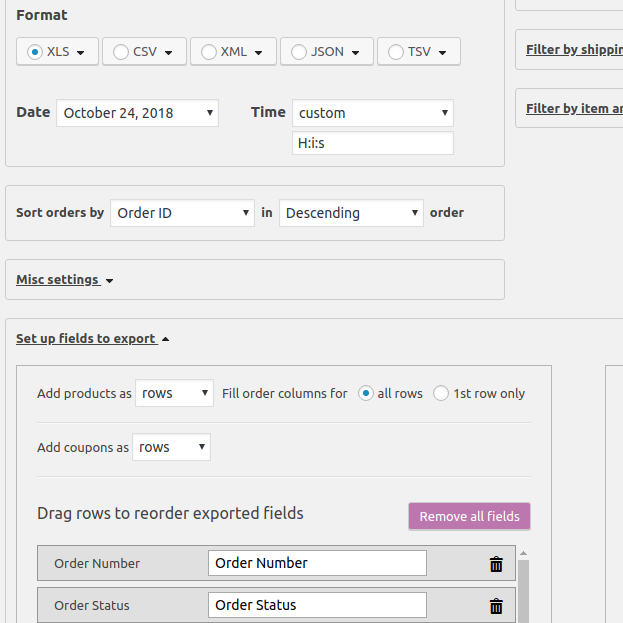
Check screenshot #5! You should open section “Set up fields”, open section “Product order items”(right column), click button “Add field”, select field in 1st dropdown, type column title and press button “Confirm”.
You should open section “Set up fields to export” and set “Fill order columns for” to “1st row only”. The plugin repeats common information for each order item (by default).
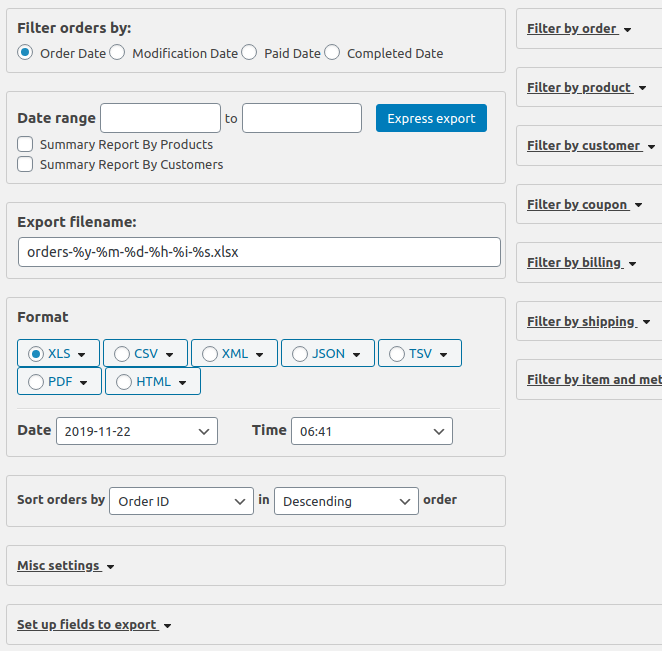
Please, unmark checkbox “Summary Report By Products” (it’s below date range)
It’s a normal situation. The plugin hides this warning on successful load.
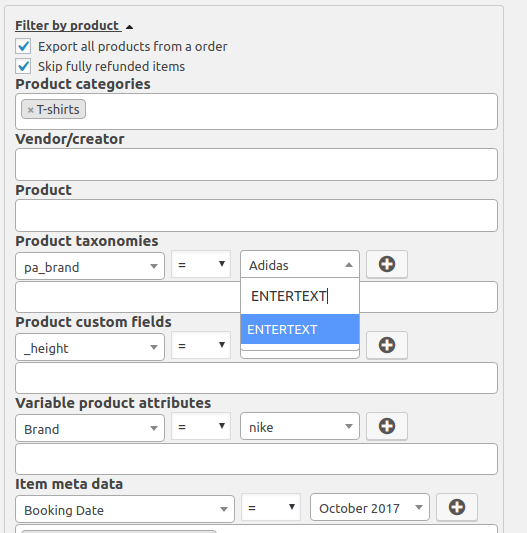
I’m sorry, but it’s impossible. You should add this attribute to Products>Attributes at first and use “Filter by Product Taxonomies”.
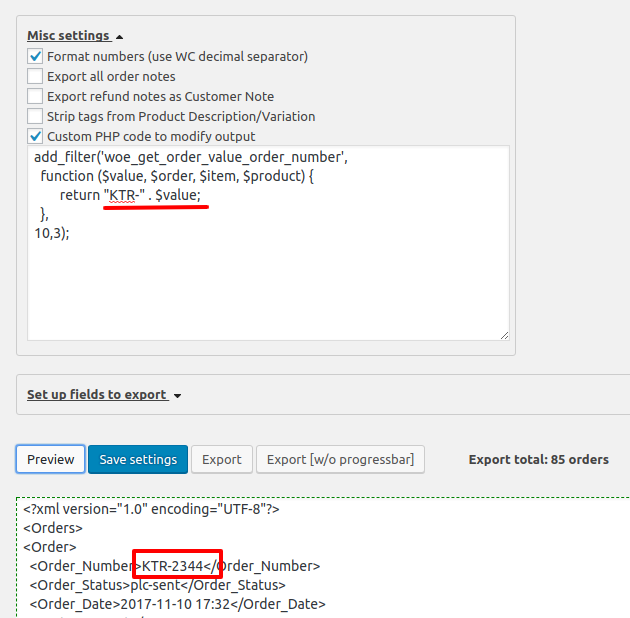
Open order, look at items and remember meta name.
Visit WooCommerce>Export Orders,
open section “Set up fields”, open section “Product order items”(at right), click button “Add field”,
select SAME name in second dropdown (screenshot #5)
#889 by installs
افزونه رسمی ترب برای افزودن قابلیتهای ترب به فروشگاههای ووکامرسی.

#74 by installs
Native integration with Google that allows merchants to easily display their products across Google’s network.

#82 by installs
PayPal's latest payment processing solution. Accept PayPal, Pay Later, credit/debit cards, alternative digital wallets and bank accounts.

#85 by installs
Accept debit and credit cards in 135+ currencies, many local methods like Alipay, ACH, and SEPA, and express checkout with Apple Pay and Google Pay.

#115 by installs
We’re here to help with tax rates: collect accurate sales tax, automatically.

#154 by installs
The WooCommerce Legacy REST API, which is now part of WooCommerce itself but will be removed in WooCommerce 9.0.
Read from the WordPress.org plugin API on , when WordPress 7.1.4 was the current release. WordPress.org rounds active installs into buckets. These are the directory's figures, not my verdict, and I haven't tested this plugin.