Type to search.

#27 by installs

WPS Hide Login

by Remy PeronaVersion 1.9.19

Change wp-login.php to anything you want.

Active installs
2+ million
#27 of 1,000
Downloads, all time
32.9M
32,882,910
Downloads, 30 days
262.1K
62.2K in the last 7
Rating
4.8 / 5
2,111 reviews
Last updated
3 months ago
Aug 13, 2026
Version
1.9.19
89 releases

Upkeep and compatibility

Last updatedAugust 13, 2026Updated in the last 3 months
Tested up toWordPress 7.1.4Covers WordPress 7.1.4, the current release
Needs WordPress4.1 or newer
Needs PHP7.0 or newer
First publishedApril 23, 2015
Support, last two months0 of 1 threads resolved (0%)

Reviews

4.8 / 5 from 2,111 reviews

Reviews by star rating
5 stars1,987
4 stars35
3 stars19
2 stars8
1 star62

Downloads, last 30 days

Low 4.6K a dayHigh 17.1K a day

What the author says it does

English

WPS Hide Login is a very light plugin that lets you easily and safely change the url of the login form page to anything you want. It doesn’t literally rename or change files in core, nor does it add rewrite rules. It simply intercepts page requests and works on any WordPress website. The wp-admin directory and wp-login.php page become inaccessible, so you should bookmark or remember the url. Deactivating this plugin brings your site back exactly to the state it was before.

This plugin is kindly proposed by WPServeur the specialized WordPress web host.

Discover also our other free extensions:

– WPS Limit Login to block brute force attacks.

– WPS Bidouille to optimize your WordPress and get more info.

– WPS Cleaner to clean your WordPress site.

This plugin is only maintained, which means we do not guarantee free support. Consider reporting a problem and be patient.

Français

The opening of the plugin's own description. The full text, installation notes and changelog are on its WordPress.org page.

Questions the author answers

I forgot my login url!

Either go to your MySQL database and look for the value of whl_page in the options table, or remove the wps-hide-login folder from your plugins folder, log in through wp-login.php and reinstall the plugin.

On a multisite install the whl_page option will be in the sitemeta table, if there is no such option in the options table.

Registration and lost password URL

You have to give the url. example: /login?action=register or /login?action=lostpassword

But there is no redirection via the plugin, the default URL of WordPress (/wp-login.php?action=register or /wp-login.php?action=lostpassword) otherwise everyone could know the url of administration of your site.

I’m locked out!

This case can come from plugins modifying your .htaccess files to add or change rules, or from an old WordPress MU configuration not updated since Multisite was added.

First step is to check your .htaccess file and compare it to a regular one, to see if the problem comes from it.

J’ai oublié mon identifiant de connexion !

Allez dans votre base de données MySQL et recherchez la valeur de ‘whl_page’ dans la table des options, ou supprimez le dossier ‘wps-hide-login’ de votre dossier ‘plugins’, connectez-vous via wp-login.php et réinstallez le plugin .

Sur une installation multisite, l’option ‘whl_page’ sera dans la table de sitemeta, si l’option n’existe pas dans la table des options.

URL d’inscription et de mot de passe oublié

Il vous faut donner l’url. exemple : /login?action=register ou /login?action=lostpassword

Mais il n’y pas de redirection via le plugin, de l’url par défaut de WordPress (/wp-login.php?action=register ou /wp-login.php?action=lostpassword) sinon tout le monde pourrait connaître l’url d’administration de votre site.

Je suis bloqué !

Ce cas peut provenir de plugins modifiant vos fichiers .htaccess pour ajouter ou modifier des règles, ou d’une ancienne configuration de WordPress MU non mise à jour depuis l’ajout de Multisite.

La première étape consiste à vérifier votre fichier .htaccess et à le comparer à un fichier .htaccess normal, pour voir si le problème provient de ce fichier.

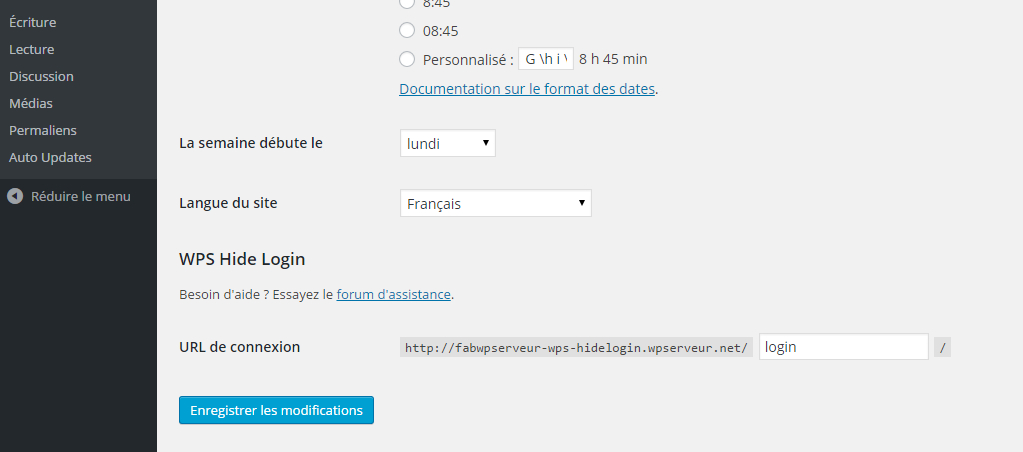
Latest changelog entry

1.9.19

  • Tested up to 7.1

Screenshots

From WordPress.org.

Tagged

Plugins that share its tags

LoginPress is a Custom Login Page Customizer plugin allows you to easily customize the layout of login, admin login, client login, register pages.

Installs
200,000+
Rating
4.8 (1.1K)
Updated
4 months ago

#500 by installs

Custom Login Page Customizer

by Adnan

Custom Login Customizer allows you to easily customize your admin login page, straight from your WordPress Customizer!

Installs
80,000+
Rating
4.8 (410)
Updated
10 months ago

#46 by installs

Loginizer

by Softaculous

Loginizer is a WordPress security plugin which helps you fight against bruteforce attacks.

Installs
1+ million
Rating
4.8 (1K)
Updated
2 days ago

#199 by installs

Limit Login Attempts

by Automattic

Limit rate of login attempts, including by way of cookies, for each IP. Fully customizable.

Installs
300,000+
Rating
4.6 (202)
Updated
4 years ago

#314 by installs

WPS Limit Login

by NicolasKulka

WPS Limit login limit connection attempts by IP address

Installs
100,000+
Rating
4.9 (83)
Updated
43 days ago

Where this page's numbers come from

Read from the WordPress.org plugin API on , when WordPress 7.1.4 was the current release. WordPress.org rounds active installs into buckets. These are the directory's figures, not my verdict, and I haven't tested this plugin. The author takes donations at their donate page.



