
#36 by installs
WP Super Cache
A very fast caching engine for WordPress that produces static html files.
- Installs
- 1+ million
- Rating
- 4.3 (1.3K)
- Updated
- 31 days ago

Get caching and more with this powerful cache plugin. Cache, optimize images, clean your database and minify for maximum performance.
Read from teamupdraft.comon
| Plan | Price | Billed | Renews at | Sites |
|---|---|---|---|---|
| Starter | $49.00 | per year | Not shown | Up to 2 sites |
| Business | $99.00 | per year | Not shown | Up to 5 sites |
| Enterprise | $194.00 | per year | Not shown | Unlimited sites |
nds (US)Wallis and FutunaWestern SaharaYemenZambiaZimbabwe - StarterUp to 2 sites $49.00 / year Add Starterto cart Includes all our premium features:
- More flexible clean-up schedules and much more! - BusinessUp to 5 sites $99.00 / year Add Businessto cart Includes all our premium features:
ore flexible clean-up schedules and much more! - EnterpriseUnlimited sites $194.00 / year Add Enterpriseto cart Includes all our premium features
If your site showcases what you do or who you are, it deserves the premium treatment.
A script read this page, and kept only what the page's text backs up. These are the vendor's list prices and its own words, not a deal and not my review. Prices change and can differ by country, so confirm on the vendor's page before you buy.
| Last updated | September 21, 2026Updated in the last 3 months |
|---|---|
| Tested up to | WordPress 7.1.4Covers WordPress 7.1.4, the current release |
| Needs WordPress | 4.9 or newer |
| Needs PHP | 7.2 or newer |
| First published | January 21, 2009 |
| Support, last two months | 7 of 16 threads resolved (44%) |
4.8 / 5 from 2,617 reviews
| 5 stars | 2,397 |
|---|---|
| 4 stars | 79 |
| 3 stars | 26 |
| 2 stars | 26 |
| 1 star | 89 |
MORE THAN A CACHING PLUGIN
WP-Optimize is trusted by more than 1 million WordPress website owners to boost performance and reduce page load times to improve your site’s user experiences and SERP rankings in Google.
It does this in four clever ways:
1. It caches your site
Caching is the process of storing a temporary HTML version of your site on the server so it can be retrieved more quickly for the user.
It’s a sure-fire way to ensure web pages load at lightning-fast speed. Turn it on in just one click.
2. It compresses images
Large images can really impact page speed load times. WP-Optimize makes it easy to identify and compress images to your preferred lossy / lossless settings in a couple of clicks.
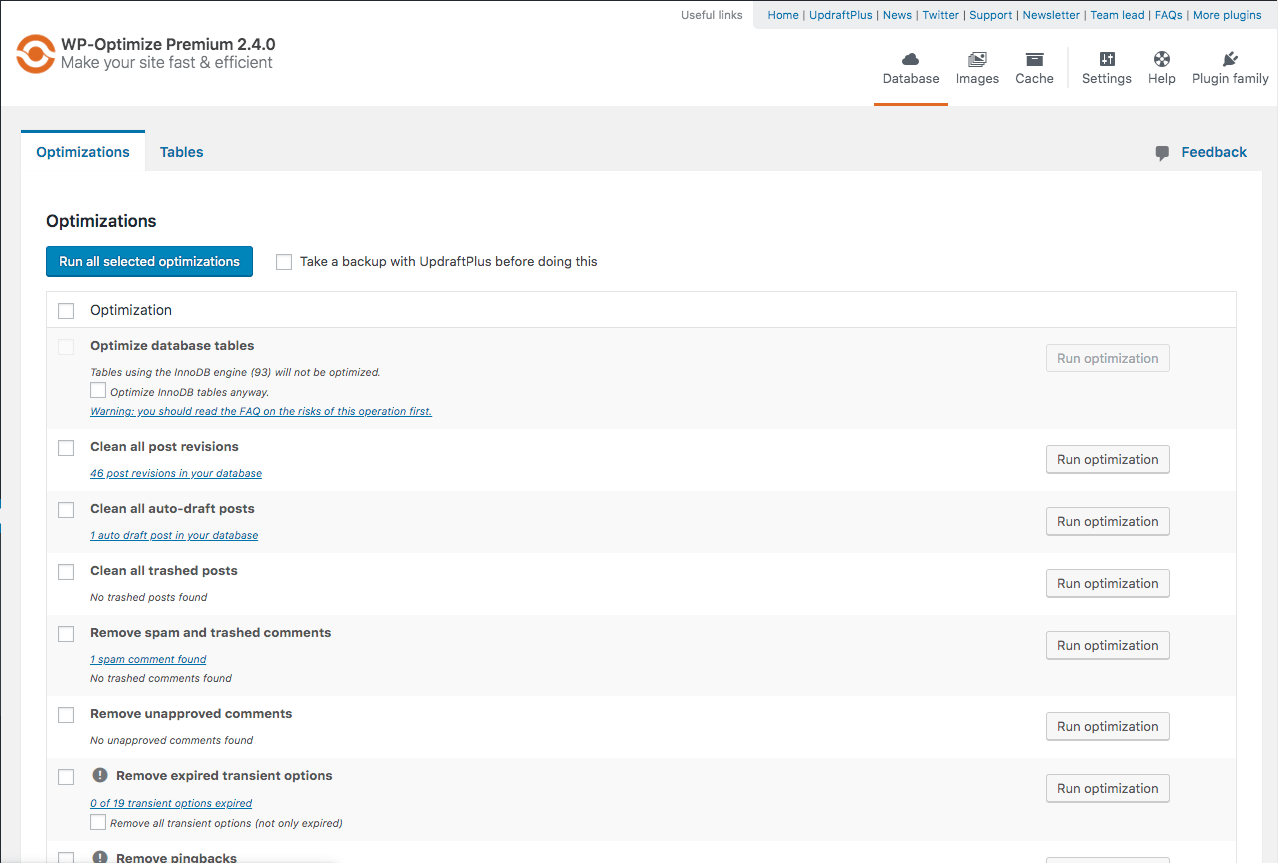
3. It cleans the database
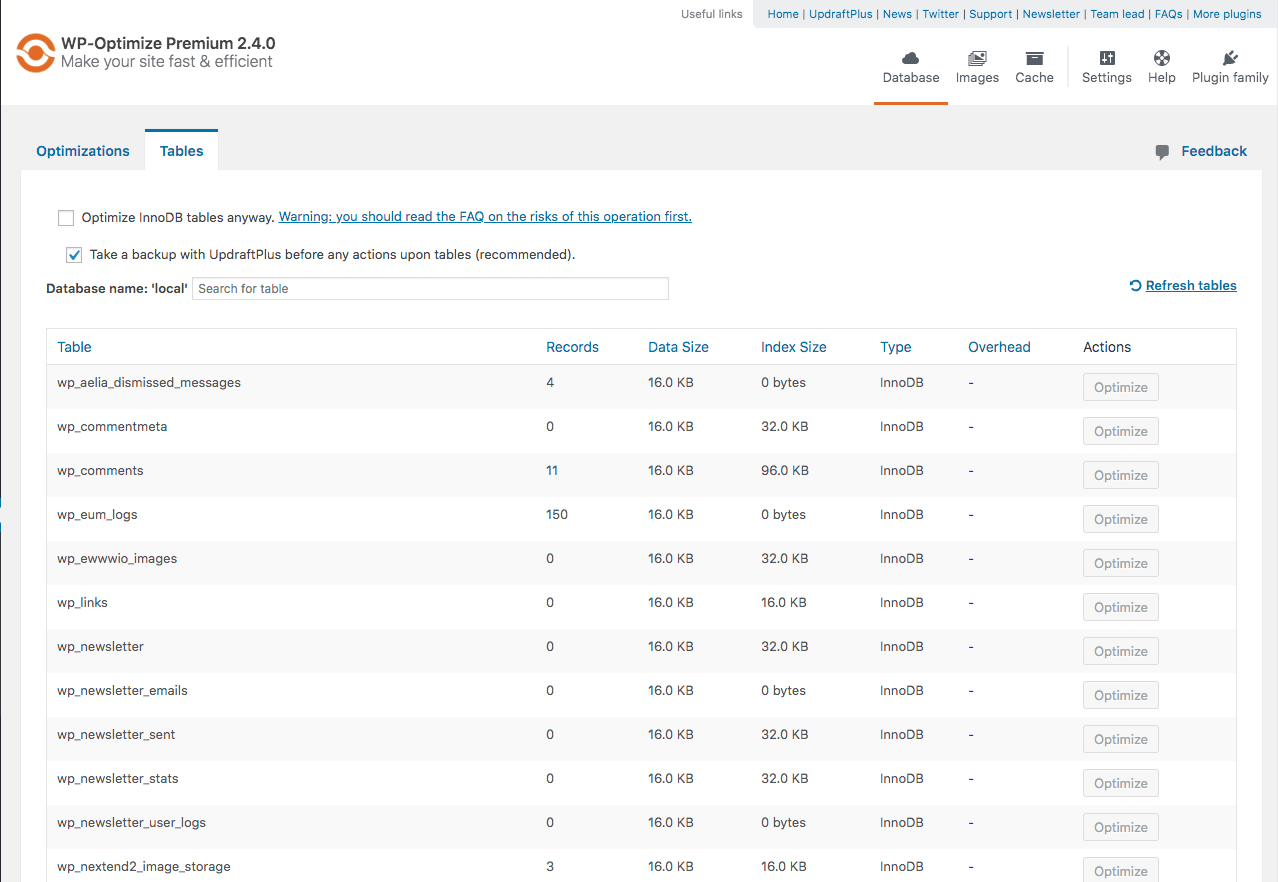
Your WordPress database stores everything that you need, plus some things that you don’t. WP-Optimize cleans and optimizes the database to speed up your site and save server resources.
4. It minifies
On top of its three main features, WP-Optimize Cache also has the more advanced minification feature.
Together with caching, minification dramatically improves performance and page speed load time.
1. CACHE YOUR SITE
Turn on caching in just one click:
WP-Optimize automatically and optimally configures itself for your WordPress site. Turn it on in one-click or refine its settings if you prefer.
More cache features:
The opening of the plugin's own description. The full text, installation notes and changelog are on its WordPress.org page.
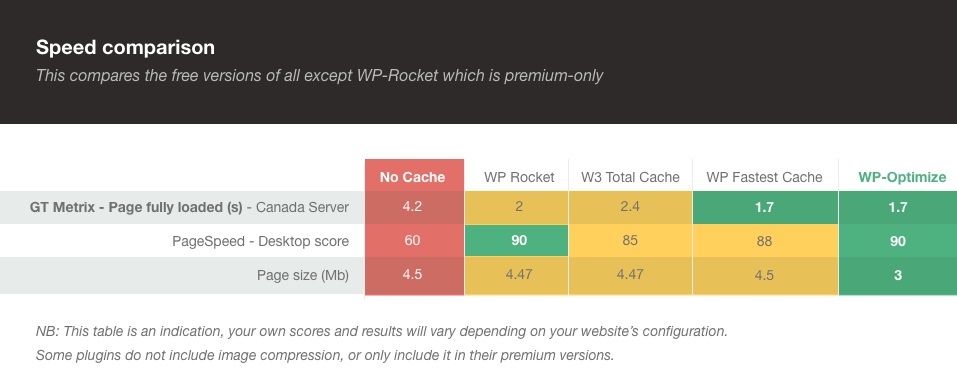
We’ve built WP-Optimize Cache around the most advanced and powerful caching technology. Our caching tests and feedback from real-world users show that the caching feature alone can make your site faster than any other cache plugin or optimization. See these speed test results.
Yes; optimizing does not involve any “tricks” or poking around in dangerous ways. It involves running routine clean-up operations using well-defined, common MySQL commands. Nevertheless, we always recommend backups, which cover every possibility; not just database malfunctions, but hackers, human errors, etc. We recommend UpdraftPlus.
This is a “how long is string?” sort of question. It depends completely on your site – how big it is, how many users interact on it, how long it has been running, and when you last optimised it. However, the savings and speed-ups can be substantial; it is always worth making sure that your database is optimised.
In our support forum, here: https://wordpress.org/support/plugin/wp-optimize/
This is rare; it’s probably because you’re with a shared web hosting company that doesn’t allow scripts to run an optimize command via SQL statements (SQL “OPTIMIZE” instruction). Please consult your web hosting company on this matter.
Yes – WP-Optimize Cache is WordPress’s #1 most-installed optimisation plugin, with over 800,000 users and a pedigree going back over 8 years.

#36 by installs
A very fast caching engine for WordPress that produces static html files.

#116 by installs
SpeedyCache is a WordPress cache plugin that helps you improve performance of your WordPress site by caching, minifying, and compressing your website.

#160 by installs
Breeze is a caching plugin developed by Cloudways. Breeze uses advance caching systems to improve site loading times exponentially.

#416 by installs
A lightweight caching plugin for WordPress that makes your website faster by generating static HTML files.

Optimize PageSpeed Performance & Core Web Vitals, Advanced Cache, Minify CSS & JavaScript, Inline Critical CSS, Defer CSS & JS, Smush & Lazy Load, CDN
Optimize and tweak WordPress by disable unused features. Improve performance, SEO and security using Clearfy — super easy, fast and zero code.
Read from the WordPress.org plugin API on , when WordPress 7.1.4 was the current release. WordPress.org rounds active installs into buckets. These are the directory's figures, not my verdict, and I haven't tested this plugin. The author takes donations at their donate page.
