
#4 by installs
Classic Editor
Enables the previous "classic" editor and the old-style Edit Post screen with TinyMCE, Meta Boxes, etc. Supports all plugins that extend this screen.
- Installs
- 8+ million
- Rating
- 4.9 (1.3K)
- Updated
- 5 months ago

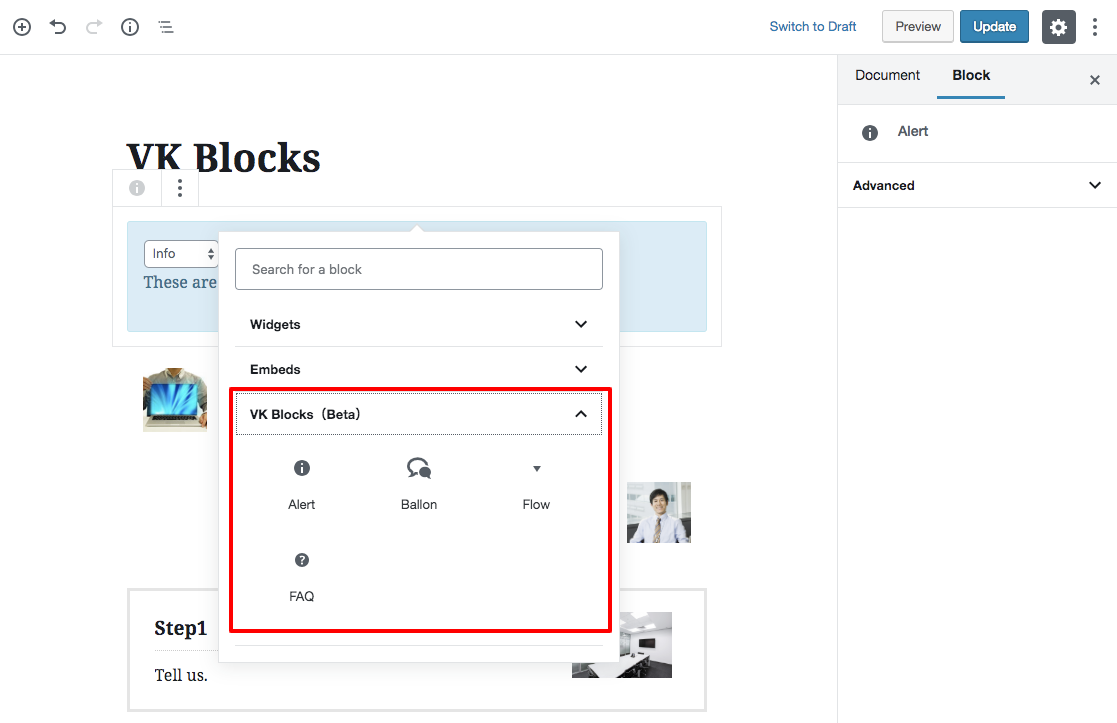
This is a plugin that extends Gutenberg's blocks.
| Last updated | October 20, 2026Updated in the last 3 months |
|---|---|
| Tested up to | WordPress 7.1.4Covers WordPress 7.1.4, the current release |
| Needs WordPress | 6.6 or newer |
| Needs PHP | 7.4 or newer |
| First published | November 26, 2018 |
| Support, last two months | 1 of 1 threads resolved (100%) |
4.8 / 5 from 6 reviews
| 5 stars | 5 |
|---|---|
| 4 stars | 1 |
| 3 stars | 0 |
| 2 stars | 0 |
| 1 star | 0 |
This is a plugin that extends Gutenberg’s blocks.
[Blocks]
* Alert
* Balloon
* Border Box
* Button
* Classic FAQ
* New FAQ
* Flow
* Heading (not recommended)
* Icon
* Icon Outer
* Page Content
* PR Blocks (not recommended)
* PR Content (not recommended)
* Responsive Spacer
* Staff (not recommended)
* Page list from ancestor
* Slider
* Visual Embed
* Accordion [ Pro ]
* Animation [ Pro ]
* Archive list [ Pro ]
* Blog Card [ Pro ]
* Breadcrumb [ Pro ]
* Button Outer [ Pro ]
* Card [ Pro ] (not recommended)
* Category Badge [ Pro ]
* Child page list [ Pro ]
* Dynamic Text ( Post Type name / Ancestor Page name ) [ Pro ]
* Fixed Display [ Pro ]
* Icon Card [ Pro ] (not recommended)
* Post list [ Pro ]
* Post list Slider [ Pro ]
* New Badge [ Pro ]
* Selected Post List [ Pro ]
* Step [ Pro ]
* Tab [ Pro ]
* Table of Contents [ Pro ]
* Taxonomy [ Pro ]
* Timeline [ Pro ]
* Grid Column [ Pro ]
* Grid Column Card [ Pro ]
* Outer [ Pro ]
[Extensions]
* Hidden extension
* Highlighter
* Inline Font Size
* Margin extension
* Nowrap
* Responsive BR
* Columns direction
* Custom CSS [ Pro ]
* Link toolbar
[ Settings ]
* Balloon
* Custom Format [ Pro ]
* Custom Block Style [ Pro ]
* Common Margin
* Load Separate
* FAQ Block [ Pro ]
* Custom CSS [ Pro ]
* Block Manager
* Block Style Manager
[ Tools ]
* Import Export
The opening of the plugin's own description. The full text, installation notes and changelog are on its WordPress.org page.
The search keyword is a fixed filter; it does not add a search field to the site.
A keyword makes WordPress treat the block query as a search (is_search()), so themes or search plugins may affect its results.
Once a keyword is saved, the post containing the block may appear in its own results, because block settings are saved in the post content and WordPress searches it (the same as the core Query Loop block).
[ New Feature ][ Post List Block (Pro) ][ Post List Slider Block (Pro) ] Added fixed keyword search and parent filters for displaying matching posts or direct child pages.
[ Spec Change ][ Post List Block (Pro) / Post List Slider Block (Pro) / Select Post List Block (Pro) / Child Page List Block (Pro) ] Updated the vk-term-color library used for category colors from 0.7.1 to 0.7.4, also adding a permission check when saving a term color and hardening the library against invalid input (fatal errors / PHP warnings in a few edge cases).

#4 by installs
Enables the previous "classic" editor and the old-style Edit Post screen with TinyMCE, Meta Boxes, etc. Supports all plugins that extend this screen.

#25 by installs
Enables the previous "classic" widgets settings screens in Appearance - Widgets and the Customizer. Disables the block editor from managing widgets.

#30 by installs
Extends and enhances the block editor (Gutenberg) and the classic editor (TinyMCE).

#63 by installs
Gutenberg blocks for existing Spectra websites. Maintained, stable, and fully supported — no action needed on your part.

#102 by installs
20+ Gutenberg Blocks with endless options, enabling top-notch efficiency for high-performance dynamic website creation.

#117 by installs
Disable Gutenberg Block Editor and restore the Classic Editor and original Edit Post screen (TinyMCE, meta boxes, etc.).
Read from the WordPress.org plugin API on , when WordPress 7.1.4 was the current release. WordPress.org rounds active installs into buckets. These are the directory's figures, not my verdict, and I haven't tested this plugin.