
#4 by installs
Classic Editor
Enables the previous "classic" editor and the old-style Edit Post screen with TinyMCE, Meta Boxes, etc. Supports all plugins that extend this screen.
- Installs
- 8+ million
- Rating
- 4.9 (1.3K)
- Updated
- 5 months ago

Disable Gutenberg Block Editor and restore the Classic Editor and original Edit Post screen (TinyMCE, meta boxes, etc.).
| Last updated | July 18, 2026Updated in the last year |
|---|---|
| Tested up to | WordPress 7.1.4Covers WordPress 7.1.4, the current release |
| Needs WordPress | 4.9 or newer |
| Needs PHP | 5.6.20 or newer |
| First published | April 18, 2018 |
| Support, last two months | 1 of 1 threads resolved (100%) |
5.0 / 5 from 735 reviews
| 5 stars | 727 |
|---|---|
| 4 stars | 0 |
| 3 stars | 3 |
| 2 stars | 1 |
| 1 star | 4 |
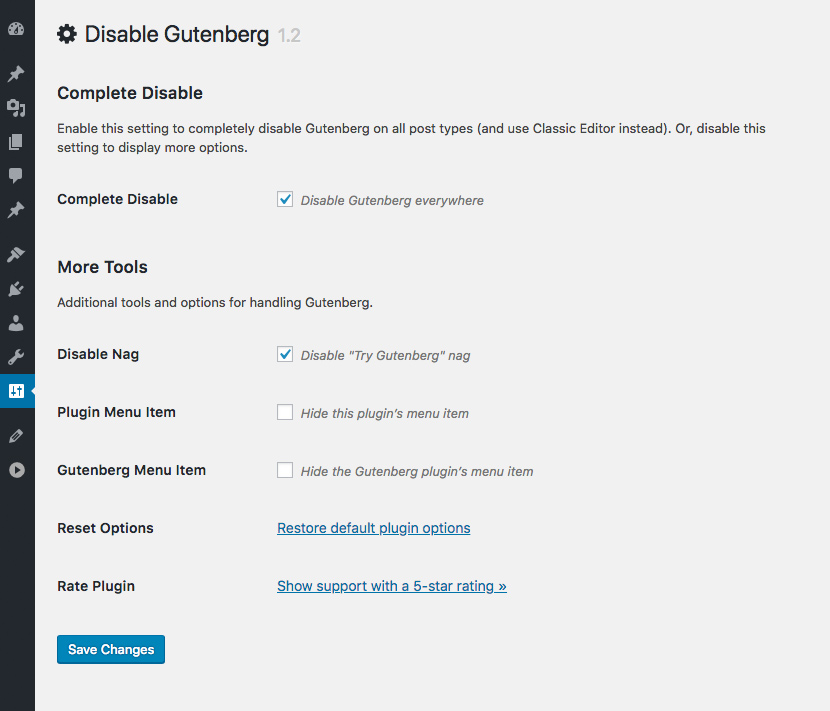
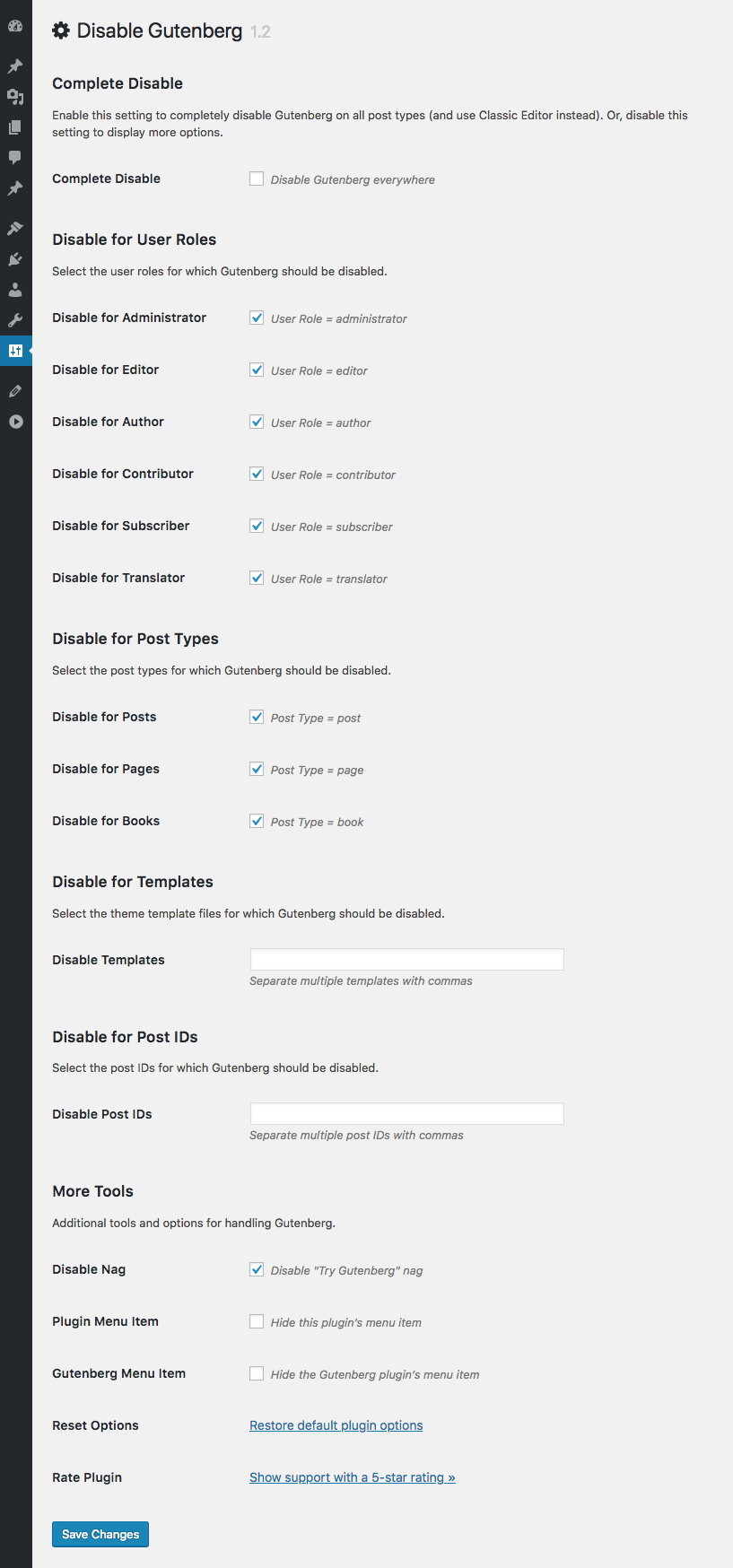
This plugin disables the new Gutenberg Editor (aka Block Editor) and replaces it with the Classic Editor. You can disable Gutenberg completely, or selectively disable for posts, pages, roles, post types, and theme templates. Plus you can hide the Gutenberg nag, menu item, and more!
♠ The all-in-one, COMPLETE solution for handling Gutenberg
♠ Hide ALL traces of Gutenberg and replace with Classic Editor
♠ Restores original Edit Post screen (TinyMCE, meta boxes, etc.)
The Disable Gutenberg plugin restores the classic (original) WordPress editor and the “Edit Post” screen. So you can continue using plugins and theme functions that extend the Classic Editor. Supports awesome features like Meta Boxes, Quicktags, Custom Fields, and everything else the Classic Editor can do.
Easy to Use
Just activate and done! The default plugin settings are configured to hide all traces of the Gutenberg Block Editor, and fully restore the original Classic Editor. Further options for customizing when/where Gutenberg is enabled are available in the plugin settings.
♠ Disable Block Widgets and restore Classic Widgets 🙂
Options
The opening of the plugin's own description. The full text, installation notes and changelog are on its WordPress.org page.
Yes. When Gutenberg is active, the plugin disables it (depending on your selected options) and replaces with the Classic Editor. Otherwise, if Gutenberg is not active (like with older versions of WordPress), the plugin does nothing. So it is safe to activate on any WordPress site.
Classic Editor plugin enables you to disable Gutenberg across the board, and replace it with the Classic Editor. The Disable Gutenberg plugin does the exact same thing, in the exact same way, BUT it also provides more granular control over when and where Gutenberg is replaced with the Classic Editor.
Yes, if both plugins are active at the same time, Disable Gutenberg gives priority to Classic Editor plugin. So if you want to use Disable Gutenberg, deactivate the Classic Editor plugin (you do not have to remove it, just deactivate via the WP Plugins screen).
I can’t make any promises, but I intend to develop with WordPress for the long-haul. Who knows what the future holds, but the plan is to keep Disable Gutenberg going for many years to come. Why? Because the original RTE/Visual Editor is awesome. I strongly feel it’s one of the many reasons why WordPress has enjoyed its great success.
Because it is being promoted by the Gutenberg developers and the “official” plugin for replacing Gutenberg. That’s fine, but understand that Disable Gutenberg functions the same way AND provides way more features and settings. FWIW, I use Disable Gutenberg on my own sites Perishable Press, DigWP.com, Plugin Planet, and many others. 100% solid.
In order for template exclusions to work, the template must be registered with the page itself. The only way to do this is via the “Edit Page” screen, in the “Page Attributes” meta box. There you will find an option to set the page template. Remember to save your changes.
Thank you to everyone for using Disable Gutenberg and for all the awesome 5-star reviews!
If you have any feedback or suggestions to make this plugin the absolute best it can be, and/or would like to help with development, please reach me via the contact form at Plugin Planet.
3.3.2 (2026/07/18)
3.3.1 (2026/04/17)
Full changelog @ https://plugin-planet.com/wp/changelog/disable-gutenberg.txt
#4 by installs
Enables the previous "classic" editor and the old-style Edit Post screen with TinyMCE, Meta Boxes, etc. Supports all plugins that extend this screen.

#30 by installs
Extends and enhances the block editor (Gutenberg) and the classic editor (TinyMCE).

#25 by installs
Enables the previous "classic" widgets settings screens in Appearance - Widgets and the Customizer. Disables the block editor from managing widgets.

#63 by installs
Gutenberg blocks for existing Spectra websites. Maintained, stable, and fully supported — no action needed on your part.

#102 by installs
20+ Gutenberg Blocks with endless options, enabling top-notch efficiency for high-performance dynamic website creation.

#216 by installs
A small collection of lightweight WordPress blocks that can accomplish nearly anything.
Read from the WordPress.org plugin API on , when WordPress 7.1.4 was the current release. WordPress.org rounds active installs into buckets. These are the directory's figures, not my verdict, and I haven't tested this plugin. The author takes donations at their donate page.