The best WordPress backup and migration plugin. Quickly and easily backup ,migrate, copy, move, or clone your site from one location to another.
- Installs
- 1+ million
- Rating
- 4.9 (4.9K)
- Updated
- 4 days ago

Backup, restore or migrate your WordPress website to another host or domain. Schedule backups or run manually. Migrate in minutes.
Read from teamupdraft.comon
| Plan | Price | Billed | Renews at | Sites |
|---|---|---|---|---|
| Personal | $70.00 | per year | Not shown | Up to 2 sites |
| Business | $95.00 | per year | Not shown | Up to 10 sites |
| Agency | $145.00 | per year | Not shown | Up to 35 sites |
| Enterprise | $195.00 | per year | Not shown | Unlimited sites |
| Gold | $399.00 | per year | Not shown | Unlimited sites |
Up to 50GB of storage Choose your plan - Personal Up to 2 sites + Basic staging $70.00 / year - Business Up to 10 sites + Standard staging $95.00 / year - Agency Up to 35
Up to 2 sites + Basic staging $70.00 / year - Business Up to 10 sites + Standard staging $95.00 / year - Agency Up to 35 sites + Advanced staging $145.00 / year - Enterprise Unlim
p to 10 sites + Standard staging $95.00 / year - Agency Up to 35 sites + Advanced staging $145.00 / year - Enterprise Unlimited sites + Ultimate staging $195.00 / year - Gold Unlim
5 sites + Advanced staging $145.00 / year - Enterprise Unlimited sites + Ultimate staging $195.00 / year - Gold Unlimited + Ultimate staging + 50GB storage $399.00 / year [Get Per
ites + Ultimate staging $195.00 / year - Gold Unlimited + Ultimate staging + 50GB storage $399.00 / year [Get Personal Now](https://teamupdraft.com/cart/?qty=1&add-to-cart=1350)
UpdraftPlus is for anyone who wants full control over their WordPress backups, not just reliance on host-level backups.
A script read this page, and kept only what the page's text backs up. These are the vendor's list prices and its own words, not a deal and not my review. Prices change and can differ by country, so confirm on the vendor's page before you buy.
| Last updated | October 26, 2026Updated in the last 3 months |
|---|---|
| Tested up to | WordPress 7.1.4Covers WordPress 7.1.4, the current release |
| Needs WordPress | 3.9 or newer |
| Needs PHP | Not stated |
| First published | May 22, 2012 |
| Support, last two months | 26 of 50 threads resolved (52%) |
4.8 / 5 from 8,706 reviews
| 5 stars | 8,195 |
|---|---|
| 4 stars | 166 |
| 3 stars | 54 |
| 2 stars | 44 |
| 1 star | 247 |
The UpdraftPlus Backup & Migration Plugin is trusted by the WordPress community to backup, restore and migrate their WordPress websites. UpdraftPlus is actively installed on more than 3 million websites around the world.
Backup with UpdraftPlus
UpdraftPlus is the world’s highest ranking and most popular scheduled backup and migration plugin. Backup to your preferred storage location and restore in just three clicks.
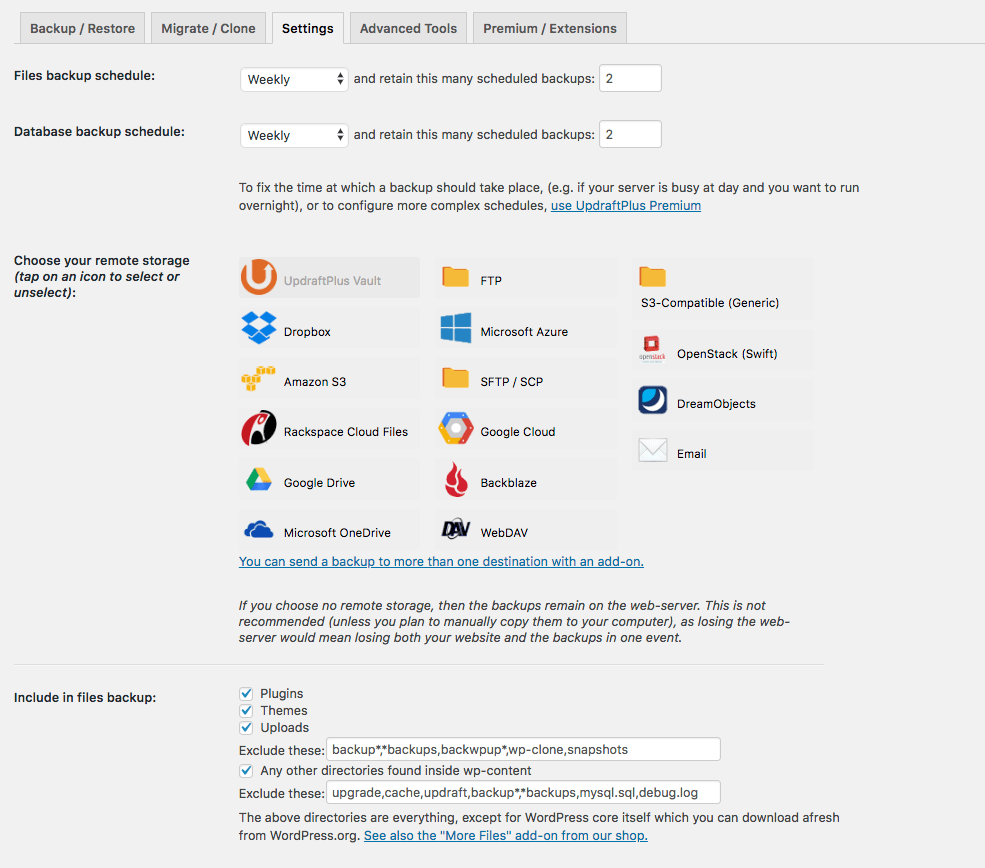
Backup to Dropbox, Google Drive, Amazon S3 (or compatible), Rackspace Cloud, FTP, DreamObjects, Openstack Swift or email.
The paid version also allows you to backup to Microsoft OneDrive, Microsoft Azure, Google Cloud, Backblaze B2, SFTP, SCP, pCloud, WebDAV or UpdraftVault, our integrated storage option for UpdraftPlus.
Backup manually or schedule to run every 2, 4, 8 or 12 hours, daily, weekly, monthly or fortnightly.
Restore with UpdraftPlus
Your WordPress website is vulnerable. Your site may get hacked. Something could go wrong with an update or your server could crash. You might need to reverse a change made or a mistake caused by human error.
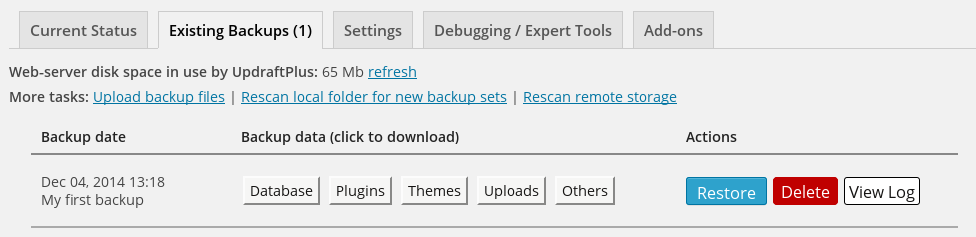
Whatever the reason, you can restore your WordPress website in just a few clicks with UpdraftPlus. Choose which components to restore (e.g. plugins, themes, database etc.), click again to restore, then click again to return to the main screen.
Migrate with UpdraftPlus
The opening of the plugin's own description. The full text, installation notes and changelog are on its WordPress.org page.
Here are the installation guidelines from our YouTube channel or from our website.
If you’re struggling to backup, migrate or restore there’s help available.
Search existing topics on the WordPress support forum or post a new one. Our support and development teams check and respond to queries everyday.
UpdraftPlus Premium customers can log a ticket directly with our support and development teams via the UpdraftPlus support hub.
Migrating in the free plugin involves downloading the backups from the source site then uploading these to the destination site.
To find the backup log: there are links to download the logs on the UpdraftPlus settings page- or you may be emailed it. Failing that, FTP into the directory wp-content/updraft and look for it there.
This problem is probably caused by your account being starved of resources by your (cheap) web host provider. This is far from ideal; although UpdraftPlus supports resuming backup runs right from the beginning to avoid everything having to be done at once, it has its limits. The best thing is to choose a more reputable web host.


The best WordPress backup and migration plugin. Quickly and easily backup ,migrate, copy, move, or clone your site from one location to another.

#100 by installs
Backup, restores, and migration with Backuply are fairly simple with a wide range of storage options from Local Backups, FTP to cloud options like AWS …

#135 by installs
Back up, restore, and protect your WordPress website with automated backups, cloud storage, one-click recovery, and AI-assisted backup management.
Automated backups, remote backup to Amazon S3 and Google Drive, stop website crashes before they happen and more. Total Upkeep is the backup solution …

#538 by installs
Secure incremental backups with staging, migration, and one-click restore for WordPress. Offsite storage and easy recovery.

#17 by installs
Connect ChatGPT, Claude, or another AI agent to your site. Plus backup, malware scan, firewall, stats, CDN, and SEO tools in one plugin.
Read from the WordPress.org plugin API on , when WordPress 7.1.4 was the current release. WordPress.org rounds active installs into buckets. These are the directory's figures, not my verdict, and I haven't tested this plugin. The author takes donations at their donate page.