
#109 by installs
SiteGuard WP Plugin
Adds WordPress login and admin protections, including CAPTCHA, login lock, login alerts, renamed login URLs, and SiteGuard WAF tuning support.
- Installs
- 600,000+
- Rating
- 4.3 (15)
- Updated
- 4 days ago

Really Simple CAPTCHA is a CAPTCHA module intended to be called from other plugins. It is originally created for my Contact Form 7 plugin.
| Last updated | August 23, 2026Updated in the last 3 months |
|---|---|
| Tested up to | WordPress 7.1.4Covers WordPress 7.1.4, the current release |
| Needs WordPress | 7.1 or newer |
| Needs PHP | 8.3 or newer |
| First published | March 10, 2009 |
| Support, last two months | 1 of 1 threads resolved (100%) |
4.2 / 5 from 131 reviews
| 5 stars | 92 |
|---|---|
| 4 stars | 15 |
| 3 stars | 1 |
| 2 stars | 4 |
| 1 star | 19 |
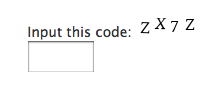
Really Simple CAPTCHA does not work alone and is intended to work with other plugins. It is originally created for Contact Form 7, however, you can use it with your own plugin.
Note: This product is “really simple” as its name suggests, i.e., it is not strongly secure. If you need perfect security, you should try other solutions.
How does it work?
Really Simple CAPTCHA does not use PHP “Sessions” for storing states, unlike many other PHP CAPTCHA solutions, but stores them as temporary files. This allows you to embed it into WordPress without worrying about conflicts.
When you generate a CAPTCHA, Really Simple CAPTCHA creates two files for it; one is an image file of CAPTCHA, and the other is a text file which stores the correct answer to the CAPTCHA.
The two files have the same (random) prefix in their file names, for example, “a7hk3ux8p.png” and “a7hk3ux8p.txt.” In this case, for example, when the respondent answers “K5GF” as an answer to the “a7hk3ux8p.png” image, then Really Simple CAPTCHA calculates hash of “K5GF” and tests it against the hash stored in the “a7hk3ux8p.txt” file. If the two match, the answer is confirmed as correct.
How to use with your plugin
Note: Below are instructions for plugin developers.
First, create an instance of ReallySimpleCaptcha class:
$captcha_instance = new ReallySimpleCaptcha();
You can change the instance variables as you wish.
The opening of the plugin's own description. The full text, installation notes and changelog are on its WordPress.org page.
Really Simple CAPTCHA needs GD and FreeType library installed on your server. Ask your server administrator if they are installed.
Also, make the temporary file folder writable. The location of the temporary file folder is managed by the instance variable tmp_dir of ReallySimpleCaptcha class. Note that the setting varies depending on the calling plugin.
#109 by installs
Adds WordPress login and admin protections, including CAPTCHA, login lock, login alerts, renamed login URLs, and SiteGuard WAF tuning support.

Add hCaptcha, Honeypot, Redirection, and AI-powered form generation to Contact Form 7.

#212 by installs
Captcha protection against spam comments & brute force login attacks using Google reCAPTCHA.

#237 by installs
Add Cloudflare Turnstile to WordPress, WooCommerce, Contact Forms & more. The user-friendly, privacy-preserving reCAPTCHA alternative. 100% free!

#341 by installs
Protect WordPress website forms from spam entries with Google reCAPTCHA.

#373 by installs
Protect, lockdown & secure login form by limiting login attempts from the same IP & banning IPs.
Read from the WordPress.org plugin API on , when WordPress 7.1.4 was the current release. WordPress.org rounds active installs into buckets. These are the directory's figures, not my verdict, and I haven't tested this plugin. The author takes donations at their donate page.