
#4 by installs
Classic Editor
Enables the previous "classic" editor and the old-style Edit Post screen with TinyMCE, Meta Boxes, etc. Supports all plugins that extend this screen.
- Installs
- 8+ million
- Rating
- 4.9 (1.3K)
- Updated
- 5 months ago

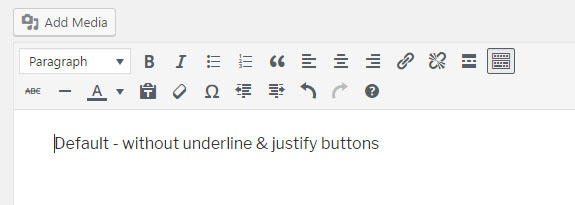
This tiny plugin re-adds the Editor text underline & text justify buttons in the WYSIWYG removed in WordPress 4.7.0
| Last updated | November 30, 2025Updated in the last year |
|---|---|
| Tested up to | WordPress 6.9.11Older than WordPress 7.1.4, the current release |
| Needs WordPress | 4.7 or newer |
| Needs PHP | 5.5.12 or newer |
| First published | November 10, 2016 |
| Support, last two months | No threads opened |
4.7 / 5 from 25 reviews
| 5 stars | 23 |
|---|---|
| 4 stars | 0 |
| 3 stars | 0 |
| 2 stars | 0 |
| 1 star | 2 |
Works well with the Classic Editor plugin, Advanced Custom Fields (Free & Pro) and is also compatible with the Gutenberg’s “Classic” bloc.
In WordPress 4.7, the core developper team decided to make various changes in the editor (TinyMce WYSIWYG), including removing the underline and justify buttons and rearranging some of the toolbar buttons.
If you don’t want to change the way you edit your content and/or don’t want to confuse your customers with a new contribution interface, this very lightweight plugin will set the editor style back to its previous state (like in WordPress 4.6 and above versions).
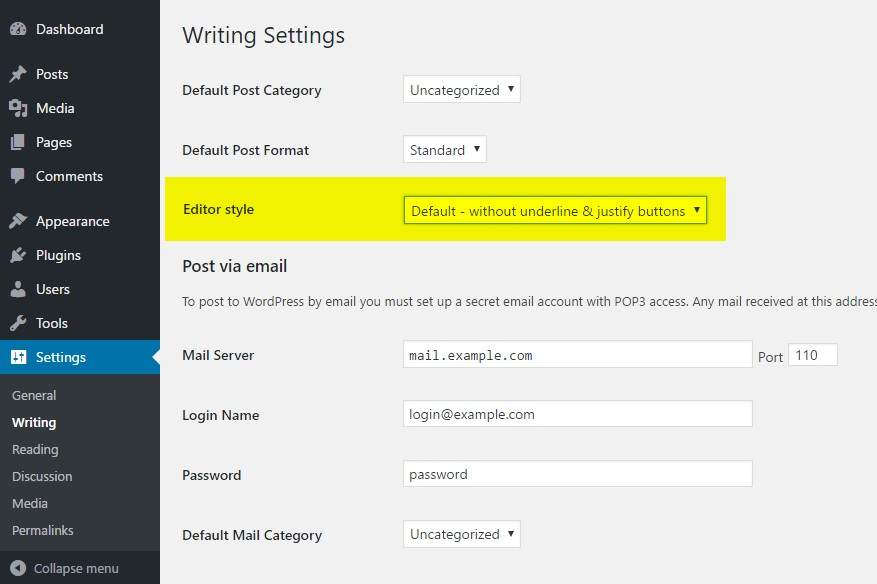
You may change the Editor style from the Writing option page.
3 options are available for the Editor style:
Please note, the previous option “Re-add underline & justify + rearrange” has been deprecated in 0.2 (sept. 2018) as it causes conflicts with the new Gutenberg editor. This option automatically switches to “Re-add underline & justify buttons” from now on.
DOCUMENTATION
CHECK OUT MY OTHER PLUGINS
Please ask for help or report bugs if anything goes wrong. It is the best way to make the community benefit!
The opening of the plugin's own description. The full text, installation notes and changelog are on its WordPress.org page.
Just go to Settings -> Writing and select the option you want under “Editor style”.


#4 by installs
Enables the previous "classic" editor and the old-style Edit Post screen with TinyMCE, Meta Boxes, etc. Supports all plugins that extend this screen.

#25 by installs
Enables the previous "classic" widgets settings screens in Appearance - Widgets and the Customizer. Disables the block editor from managing widgets.

#30 by installs
Extends and enhances the block editor (Gutenberg) and the classic editor (TinyMCE).

#63 by installs
Gutenberg blocks for existing Spectra websites. Maintained, stable, and fully supported — no action needed on your part.

#102 by installs
20+ Gutenberg Blocks with endless options, enabling top-notch efficiency for high-performance dynamic website creation.

#117 by installs
Disable Gutenberg Block Editor and restore the Classic Editor and original Edit Post screen (TinyMCE, meta boxes, etc.).
Read from the WordPress.org plugin API on , when WordPress 7.1.4 was the current release. WordPress.org rounds active installs into buckets. These are the directory's figures, not my verdict, and I haven't tested this plugin. The author takes donations at their donate page.