Type to search.

#15 by installs

Yoast Duplicate Post

by YoastVersion 4.7

The go-to tool for cloning posts and pages, including the powerful Rewrite & Republish feature.

Active installs
3+ million
#15 of 1,000
Downloads, all time
42.8M
42,763,184
Downloads, 30 days
371.5K
95.8K in the last 7
Rating
4.7 / 5
538 reviews
Last updated
25 days ago
Oct 6, 2026
Version
4.7
47 releases

What Yoast Duplicate Post's own page says

Read from yoast.comon

Who it is for

A must-have for content-heavy sites!

Use cases the vendor names

  • Sales & landing pages
  • High-traffic posts
  • Repeatable page sets
  • Client handoffs
  • Copy & design testing
  • Connected copies

Features it lists

  • One-click cloning
  • Instant duplicates
  • Live-safe editing
  • Zero downtime
  • Full control
  • Roles & visibility
  • Scheduled merge
  • Cloning at scale
  • Clone from the front end
  • Rewrite & Republish

Needs

  • Yoast SEO Premium (separate product, not required for Duplicate Post)

A script read this page, and kept only what the page's text backs up. These are the vendor's list prices and its own words, not a deal and not my review. Prices change and can differ by country, so confirm on the vendor's page before you buy.

Upkeep and compatibility

Last updatedOctober 6, 2026Updated in the last 3 months
Tested up toWordPress 7.1.4Covers WordPress 7.1.4, the current release
Needs WordPress7.0 or newer
Needs PHP7.4 or newer
First publishedDecember 5, 2007
Support, last two months1 of 2 threads resolved (50%)

Reviews

4.7 / 5 from 538 reviews

Reviews by star rating
5 stars472
4 stars19
3 stars12
2 stars12
1 star23

Downloads, last 30 days

Low 4.3K a dayHigh 33.2K a day

What the author says it does

This plugin allows users to clone posts of any type, or copy them to new drafts for further editing.

How it works:

• In ‘Edit Posts’/’Edit Pages’, you can click on ‘Clone’ link below the post/page title: this will immediately create a copy and return to the list.

• In ‘Edit Posts’/’Edit Pages’, you can select one or more items, then choose ‘Clone’ in the ‘Bulk Actions’ dropdown to copy them all at once.

• In ‘Edit Posts’/’Edit Pages’, you can click on ‘New Draft’ link below the post/page title.

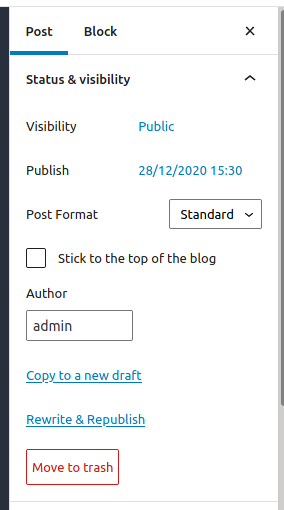
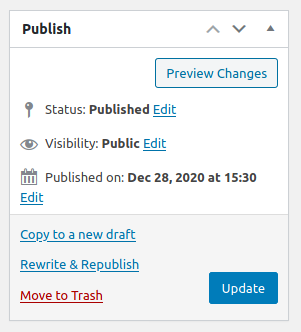
• On the post edit screen, you can click on ‘Copy to a new draft’ above “Cancel”/”Move to trash” or in the admin bar.

• While viewing a post as a logged in user, you can click on ‘Copy to a new draft’ in the admin bar.

3, 4 and 5 will lead to the edit page for the new draft: change what you want, click on ‘Publish’ and you’re done.

There is also a template tag, so you can put it in your templates and clone your posts/pages from the front-end. Clicking on the link will lead you to the edit page for the new draft, just like the admin bar link.

Duplicate Post has many useful settings to customize its behavior and restrict its use to certain roles or post types. Check out the extensive documentation on yoast.com and our developer docs.

Contribute

If you find this useful and if you want to contribute, there are two ways:

The opening of the plugin's own description. The full text, installation notes and changelog are on its WordPress.org page.

Questions the author answers

The plugin doesn’t work, why?

First, check your version of WordPress: the plugin is not supposed to work on old versions anymore. Make sure also to upgrade to the last version of the plugin!

Then try to deactivate and re-activate it, some user have reported that this fixes some problems.

Pay also attention to the “Permissions” tab in the Settings: make sure the plugin is enabled for the desired roles and post types.

The plugin is not translated in my language!

From version 3.0 the plugin’s translations are managed by the WordPress.org platform and the plugin is shipped without language files, so first of all update translations under Dashboard->Updates.

If Duplicate Post is still in English, or if there are some untranslated strings, you can help translating to your language: you only need a WordPress.org account.

Latest changelog entry

See the full changelog on yoast.com.

Screenshots

First 4 of 6, from WordPress.org.

Tagged

Plugins that share its tags

#272 by installs

Migrate Guru – Site Migration & Cloning

by migrateguru

Effortlessly migrate, clone, or transfer your WordPress site to over 5,000 web hosts with Migrate Guru, trusted by Cloudways, Pantheon, and Dreamhost.

Installs
200,000+
Rating
4.9 (1.6K)
Updated
2 months ago

#451 by installs

Duplicate Menu

by Jon Christopher

Easily duplicate your WordPress menus with one click.

Installs
100,000+
Rating
4.6 (104)
Updated
10 months ago

#10 by installs

All-in-One WP Migration and Backup

by ServMask

Trusted by 60M+ sites: The gold standard for WordPress migration and backup. Migrate, backup, and restore your WordPress site with one click.

Installs
5+ million
Rating
4.5 (7.7K)
Updated
4 days ago

#16 by installs

Duplicate Page

by mndpsingh287

Duplicate Posts, Pages and Custom Posts easily using single click

Installs
3+ million
Rating
4.8 (466)
Updated
6 months ago

#69 by installs

WPvivid — Backup, Migration & Staging

by wpvividplugins

All-in-one WordPress backup, migration and staging plugin — schedule automatic backups, restore in one click, and migrate or clone sites safely.

Installs
900,000+
Rating
4.9 (1.6K)
Updated
1 day ago

#172 by installs

Duplicate Post

by Inisev

Duplicate post

Installs
300,000+
Rating
4.9 (1.6K)
Updated
38 days ago

Where this page's numbers come from

Read from the WordPress.org plugin API on , when WordPress 7.1.4 was the current release. WordPress.org rounds active installs into buckets. These are the directory's figures, not my verdict, and I haven't tested this plugin. The author takes donations at their donate page.