
#157 by installs
Admin Menu Editor
Lets you edit the WordPress admin menu. You can re-order, hide or rename menus, add custom menus and more.
- Installs
- 300,000+
- Rating
- 4.6 (312)
- Updated
- 2 months ago

This plugin enables you to set conditional menus per posts, pages, categories, archive pages, etc.
| Last updated | August 12, 2026Updated in the last 3 months |
|---|---|
| Tested up to | WordPress 7.0.8Older than WordPress 7.1.4, the current release |
| Needs WordPress | 4.0 or newer |
| Needs PHP | Not stated |
| First published | September 1, 2016 |
| Support, last two months | 0 of 1 threads resolved (0%) |
4.4 / 5 from 71 reviews
| 5 stars | 56 |
|---|---|
| 4 stars | 5 |
| 3 stars | 1 |
| 2 stars | 1 |
| 1 star | 8 |
Conditional Menus is a simple yet useful WordPress plugin by Themify, which allows you to swap the menus in the theme as per specific conditions. In short, you can have different menus in different posts, pages, categories, archive pages, etc. It works with any WordPress theme that uses the standard WordPress menu function.
How to use it
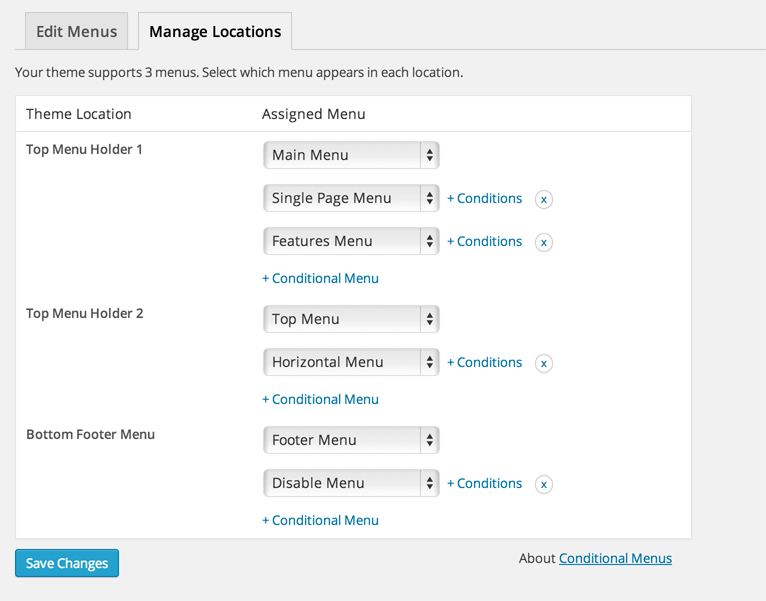
Once you activate the plugin, you will see the conditional menus on the Manage Locations tab located in your WP Admin > Appearance > Menus page.
1) To add conditional menu: click “Conditional Menu” and select a menu from the list (you can create these menus in the “Edit Menus” tab)
– You can remove the menu by selecting “Disable Menu” from the list.
2) Click on “+ Conditions” to add conditions in the modal box (tick the checkboxes where you want the menu to appear)
3) To remove the conditional menus, click on the “X” button
Visit https://themify.me/conditional-menus for more details.
The opening of the plugin's own description. The full text, installation notes and changelog are on its WordPress.org page.
The changelog is located at: https://themify.org/changelogs/conditional-menus.txt
#157 by installs
Lets you edit the WordPress admin menu. You can re-order, hide or rename menus, add custom menus and more.

#46 by installs
Loginizer is a WordPress security plugin which helps you fight against bruteforce attacks.

#70 by installs
Redux is a simple, truly extensible, and fully responsive options framework for WordPress themes and plugins. It ships with an integrated demo.

#166 by installs
An easy to use mega menu plugin. Written the WordPress way.

#233 by installs
Customise dashboard panels and branding, hide menus plus lots more.

#407 by installs
Adds an image or icon in the menu items. You can choose the position of the image (after, before, above, below) or even hide the menu item title.
Read from the WordPress.org plugin API on , when WordPress 7.1.4 was the current release. WordPress.org rounds active installs into buckets. These are the directory's figures, not my verdict, and I haven't tested this plugin.