
#74 by installs
Google for WooCommerce
Native integration with Google that allows merchants to easily display their products across Google’s network.
- Installs
- 800,000+
- Rating
- 2.7 (268)
- Updated
- 11 days ago

The discount plugin for WooCommerce helps you create bulk discount, quantity discount, storewide sale, dynamic pricing discount offers easily.
| Last updated | September 17, 2026Updated in the last 3 months |
|---|---|
| Tested up to | WordPress 7.1.4Covers WordPress 7.1.4, the current release |
| Needs WordPress | 6.2 or newer |
| Needs PHP | Not stated |
| Needs plugins | woocommerce |
| First published | December 13, 2016 |
| Support, last two months | 0 of 5 threads resolved (0%) |
4.9 / 5 from 1,395 reviews
| 5 stars | 1,325 |
|---|---|
| 4 stars | 18 |
| 3 stars | 9 |
| 2 stars | 9 |
| 1 star | 34 |
Discount Rules for WooCommerce is a dynamic pricing and discounts plugin for WooCommerce that helps you create any type of bulk discounts, quantity discounts, product specific discounts, dynamic pricing, advanced discounts based on conditions, percentage discounts, tiered pricing discounts and more.
With the PRO version, you can create advanced discount offers such as buy one and get one free (BOGO) deals, auto-apply coupons, free shipping discounts, bundle offers, discounts based on products, categories, attributes, tags, SKUs, user roles, cart items, purchase history and much more.
The plugin offers a number of features that make it easy for customers to discover discounts and offers in your store:
View Demo | Documentation with examples | Ask Questions | PRO version | Examples
DISCOUNT TYPES AND FEATURES WITH EXAMPLE SCENARIOS
Free version features
The opening of the plugin's own description. The full text, installation notes and changelog are on its WordPress.org page.
Yes. It is possible to create multiple discount offers. You can let them apply based on conditions
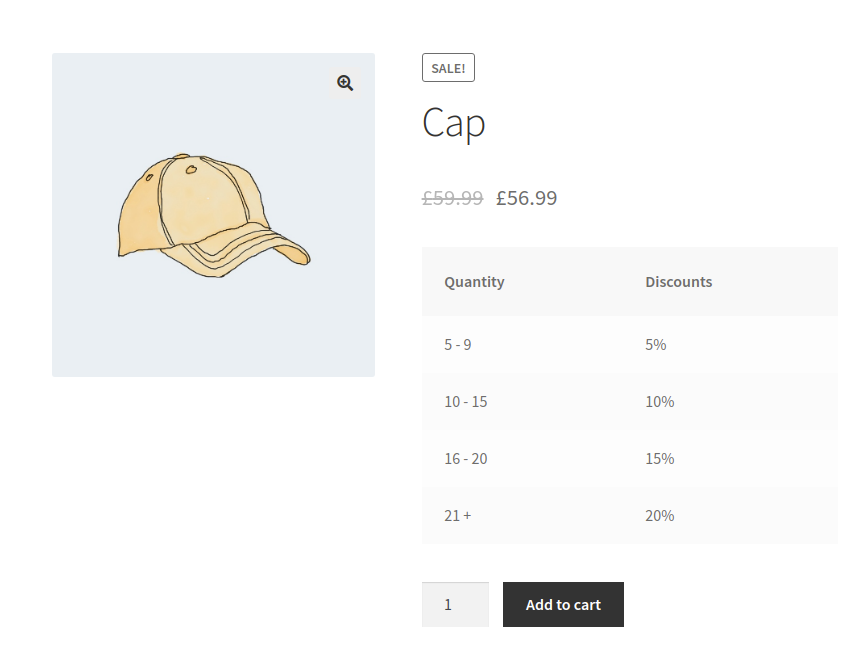
After installing the Discount Rules plugin for WooCommerce, navigate to your WordPress dashboard -> WooCommerce -> Discount Rules -> Create a new rule and choose the discount type as “Bulk Discount”. Add quantity tiers and discount for each tier before going live
Navigate to your WordPress dashboard -> WooCommerce -> Discount Rules -> Create a new rule and choose the discount type as “Bulk Discount”. Click on the Add range button to create quantity ranges and set a discount for each range. Once done, publish the discount
Volume discounts are similar to creating the bulk discounts. Navigate to your WordPress dashboard -> WooCommerce -> Discount Rules -> Create a new rule and choose the discount type as “Bulk Discount”. Click on the Add range button to create quantity ranges and set a discount for each range. Once done, publish the discount.
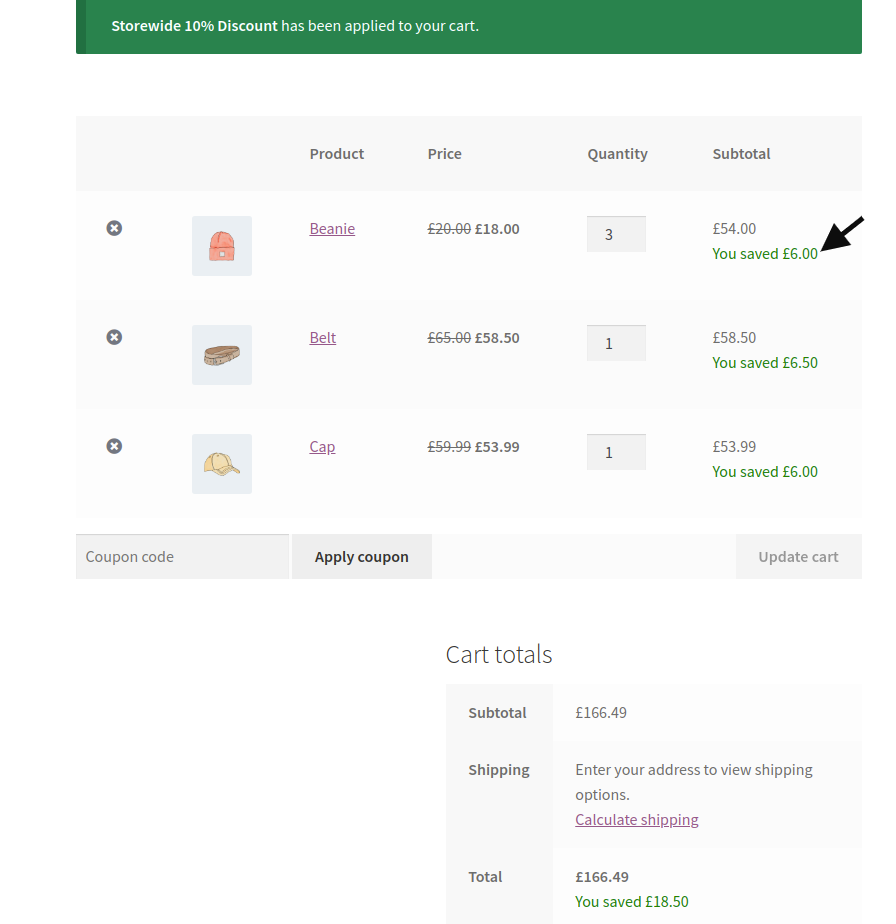
Creating a percentage discount is quite easy. Navigate to your WordPress dashboard -> WooCommerce -> Discount Rules -> Create a new rule and choose the discount type as “Product Adjustment”. In the Filters section, choose either All Products or select the products that you would like to discount. In the discount section, enter the percentage value. Example: A 10% discount. Once done, save and publish
Navigate to your WordPress dashboard -> WooCommerce -> Discount Rules -> Create a new rule and choose the discount type as “Product adjustment”. In the Filters section, choose All Products. In the discount section, choose the percentage option and enter a value. Example: 10%. Save and publish the rule.


#74 by installs
Native integration with Google that allows merchants to easily display their products across Google’s network.

#82 by installs
PayPal's latest payment processing solution. Accept PayPal, Pay Later, credit/debit cards, alternative digital wallets and bank accounts.

#85 by installs
Accept debit and credit cards in 135+ currencies, many local methods like Alipay, ACH, and SEPA, and express checkout with Apple Pay and Google Pay.

#115 by installs
We’re here to help with tax rates: collect accurate sales tax, automatically.

#154 by installs
The WooCommerce Legacy REST API, which is now part of WooCommerce itself but will be removed in WooCommerce 9.0.

#165 by installs
Create, print & automatically email PDF or XML Invoices & PDF Packing Slips for WooCommerce orders.
Read from the WordPress.org plugin API on , when WordPress 7.1.4 was the current release. WordPress.org rounds active installs into buckets. These are the directory's figures, not my verdict, and I haven't tested this plugin. The author takes donations at their donate page.