
#74 by installs
Google for WooCommerce
Native integration with Google that allows merchants to easily display their products across Google’s network.
- Installs
- 800,000+
- Rating
- 2.7 (268)
- Updated
- 11 days ago

WCBoost – Variation Swatches is the ultimate plugin to display WooCommerce product variations in style.
| Last updated | October 13, 2026Updated in the last 3 months |
|---|---|
| Tested up to | WordPress 7.1.4Covers WordPress 7.1.4, the current release |
| Needs WordPress | 4.5 or newer |
| Needs PHP | 7.0 or newer |
| First published | August 21, 2021 |
| Support, last two months | No threads opened |
4.8 / 5 from 5 reviews
| 5 stars | 4 |
|---|---|
| 4 stars | 1 |
| 3 stars | 0 |
| 2 stars | 0 |
| 1 star | 0 |
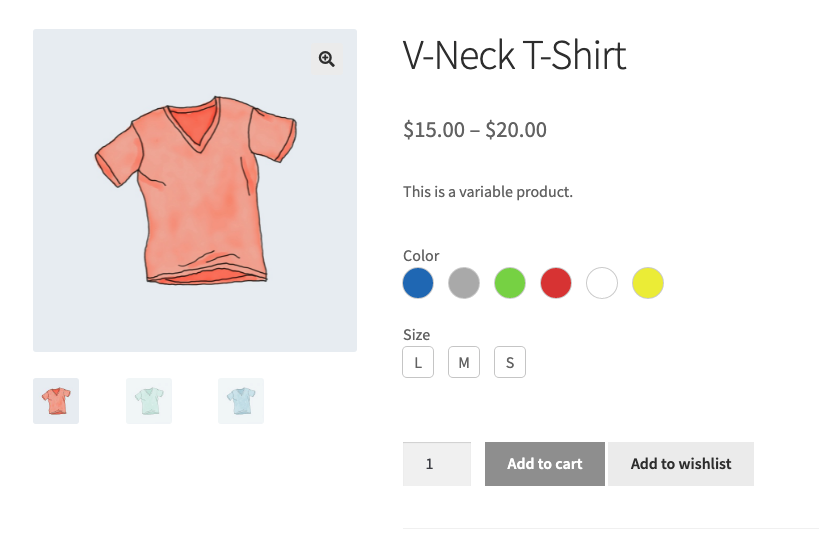
WCBoost – Variation Swatches is a WooCommerce extension that enhances the appearance and functionality of variable products. By replacing the default dropdown menus with visually appealing swatches, this plugin allows customers to quickly view and select product variations such as colors, sizes, and styles at a glance.
WCBoost Variation Swatches elevates your store’s aesthetic and simplifies the selection process for your customers. With this plugin, you can showcase your products in a way that’s not only pleasing to the eye but also intuitive to use.
Live Demo | Documentation
Whether you’re selling clothing, accessories, electronics, or any other type of product with variations, this plugin empowers you to showcase your offerings in a visually stunning and user-friendly manner, helping you stand out in today’s competitive e-commerce landscape.
Why you need variation swatches for your store?
The default WooCommerce dropdowns are not very appealing and user-friendly. They can cause some problems for your customers, such as:
How this plugin can help you improve your store?
The opening of the plugin's own description. The full text, installation notes and changelog are on its WordPress.org page.
Yes, it will work with any theme, but may require some styling to make it match nicely.
Yes, it does work with WordPress multisite.
By default, this plugin will convert all variation dropdowns to buttons (Of course, you can disable this feature with a single option in the Customizer > WooCommerce). You are able to change them to other swatch types.
Following the standards of WordPress and WooCommerce, you can find all the settings that relate to the appearance of your website in Appearance > Customize. The settings of this plugin are in the Customize > WooCommerce > Variation Swatches section.
WooCommerce has an option to hide out-of-stock products from the catalog, it works for the variation swatches too. You just need to enable this option in WooCommerce > Products > Inventory. It is the option “Out of stock visibility”.


#74 by installs
Native integration with Google that allows merchants to easily display their products across Google’s network.

#82 by installs
PayPal's latest payment processing solution. Accept PayPal, Pay Later, credit/debit cards, alternative digital wallets and bank accounts.

#85 by installs
Accept debit and credit cards in 135+ currencies, many local methods like Alipay, ACH, and SEPA, and express checkout with Apple Pay and Google Pay.

#115 by installs
We’re here to help with tax rates: collect accurate sales tax, automatically.

#154 by installs
The WooCommerce Legacy REST API, which is now part of WooCommerce itself but will be removed in WooCommerce 9.0.

#165 by installs
Create, print & automatically email PDF or XML Invoices & PDF Packing Slips for WooCommerce orders.
Read from the WordPress.org plugin API on , when WordPress 7.1.4 was the current release. WordPress.org rounds active installs into buckets. These are the directory's figures, not my verdict, and I haven't tested this plugin.