
#606 by installs
Nav Menu Roles
Hide custom menu items based on user roles.
- Installs
- 70,000+
- Rating
- 4.9 (219)
- Updated
- 1 day ago

Show/hide menu items to logged in users, logged out users or specific user roles. Display logged in user details in menu. Add a logout link to menu.
| Last updated | September 13, 2026Updated in the last 3 months |
|---|---|
| Tested up to | WordPress 7.1.0Covers WordPress 7.1.4, the current release |
| Needs WordPress | 4.6 or newer |
| Needs PHP | 5.6 or newer |
| First published | August 12, 2016 |
| Support, last two months | 0 of 1 threads resolved (0%) |
5.0 / 5 from 1,281 reviews
| 5 stars | 1,257 |
|---|---|
| 4 stars | 11 |
| 3 stars | 5 |
| 2 stars | 0 |
| 1 star | 8 |
User Menus is the perfect plugin for websites that have logged in users.
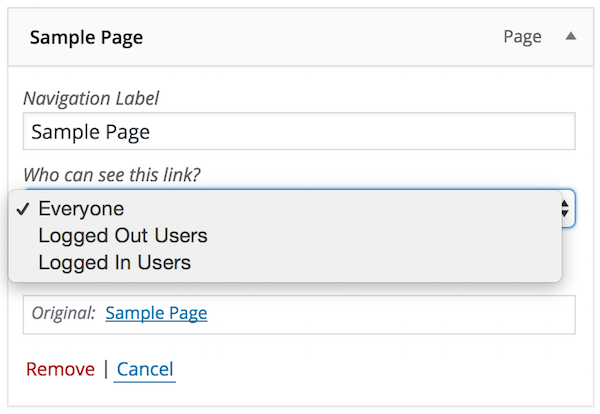
The plugin gives you more control over your nav menu by allowing you to apply visibility controls to menu items e.g., who can see each menu item (everyone, logged out users, logged in users, specific user roles).
It also enables you to display logged in user information in the navigation menu e.g., “Hello, John Doe”.
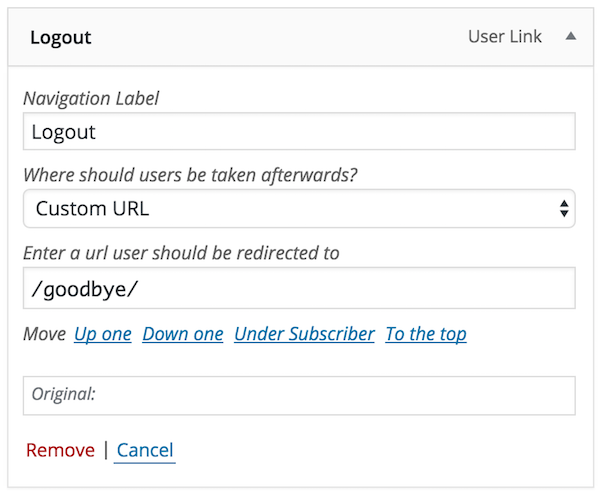
Lastly, the plugin allows you to add login, register, and logout links to your menu.
Full Feature List
User Menus allows you to do the following:
The opening of the plugin's own description. The full text, installation notes and changelog are on its WordPress.org page.
If you get stuck, you can ask for help in the User Menu Plugin Forum.
Bugs can be reported either in our support forum or preferably on the User Menu GitHub repository.

#606 by installs
Hide custom menu items based on user roles.

#407 by installs
Adds an image or icon in the menu items. You can choose the position of the image (after, before, above, below) or even hide the menu item title.

#157 by installs
Lets you edit the WordPress admin menu. You can re-order, hide or rename menus, add custom menus and more.

#166 by installs
An easy to use mega menu plugin. Written the WordPress way.

#451 by installs
Easily duplicate your WordPress menus with one click.

#559 by installs
Automatically displays a shopping cart in your menu bar. Works with WooCommerce and Easy Digital Downloads (EDD)
Read from the WordPress.org plugin API on , when WordPress 7.1.4 was the current release. WordPress.org rounds active installs into buckets. These are the directory's figures, not my verdict, and I haven't tested this plugin. The author takes donations at their donate page.