
#152 by installs
Intuitive Custom Post Order
Intuitively reorder Posts, Pages, Custom Post Types, Taxonomies, and Sites with a simple drag-and-drop interface.
- Installs
- 400,000+
- Rating
- 4.4 (139)
- Updated
- 13 months ago

Sort posts and custom post type objects using a drag-and-drop, sortable JavaScript AJAX interface, or through the default WordPress dashboard
Read from nsp-code.comon
Effortlessly customize the order of Posts, Pages, and Custom Post Types with the Advanced Post Types Order plugin — a powerful sorting solution with no code required.
A script read this page, and kept only what the page's text backs up. These are the vendor's list prices and its own words, not a deal and not my review. Prices change and can differ by country, so confirm on the vendor's page before you buy.
| Last updated | October 21, 2026Updated in the last 3 months |
|---|---|
| Tested up to | WordPress 7.1.4Covers WordPress 7.1.4, the current release |
| Needs WordPress | 2.8 or newer |
| Needs PHP | 5.6 or newer |
| First published | September 5, 2010 |
| Support, last two months | 7 of 12 threads resolved (58%) |
4.5 / 5 from 296 reviews
| 5 stars | 247 |
|---|---|
| 4 stars | 8 |
| 3 stars | 11 |
| 2 stars | 4 |
| 1 star | 26 |
Over 12 MILLIONS DOWNLOADS and near PERFECT rating out of 200 REVIEWS.
Easily Sort Posts and Custom Post Types with Drag-and-Drop
Take full control of your post order with a powerful plugin that lets you effortlessly reorder posts and custom post types using a simple drag-and-drop interface.
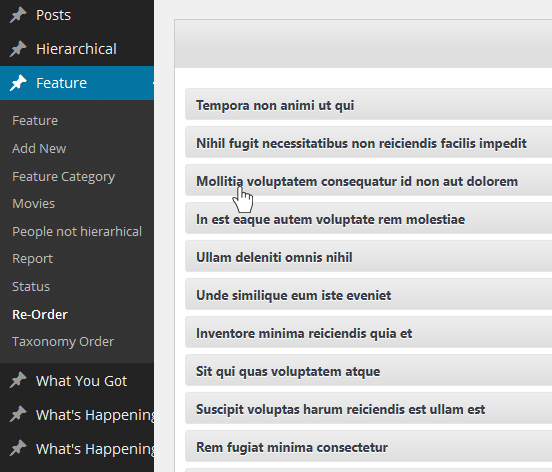
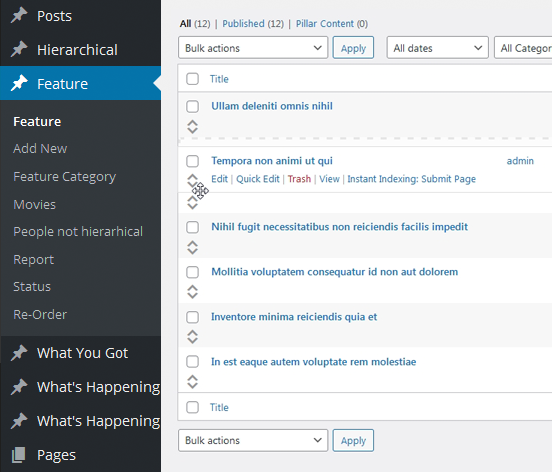
Customize the order directly from the default WordPress post archive list or use the dedicated Re-Order interface, which displays all available items for easy management. Whether you’re working with default posts or custom post types, organizing your content has never been easier.
Usage
This plugin was designed to be user-friendly, ensuring that anyone can easily use its sorting feature, regardless of their WordPress experience:
The opening of the plugin's own description. The full text, installation notes and changelog are on its WordPress.org page.
Absolutely! You don’t need any PHP knowledge to use this plugin.
Unlike many other plugins, you won’t have to make any code changes for your custom post order to apply. There’s an option to automatically update WordPress queries so posts are displayed in your custom order. If you prefer to handle this manually, you can disable the AutoSort option.
Simply include 'orderby' => 'menu_order' in your custom query arguments.
You can sort all post types you’ve defined in WordPress, as long as they are not hierarchical. This includes default post types like Posts, as well as custom types like Movies, Reviews, Data, etc.
There’s an option to display the custom post order, as defined in the sort list, directly within the main admin post list interface.
All ideas are welcome! I add them to my list for future versions. However, this may take some time. If you’re in a hurry, consider making a small donation, and I can prioritize the feature for you.
Yes, you can! To exclude certain queries, include the ignore_custom_sort argument in your custom query. An example is available at Sample Usage
#152 by installs
Intuitively reorder Posts, Pages, Custom Post Types, Taxonomies, and Sites with a simple drag-and-drop interface.

#187 by installs
Easily reorder posts, pages, custom post types, and taxonomies with intuitive drag-and-drop sorting in the WordPress admin.
Read from the WordPress.org plugin API on , when WordPress 7.1.4 was the current release. WordPress.org rounds active installs into buckets. These are the directory's figures, not my verdict, and I haven't tested this plugin.