
#60 by installs
EWWW Image Optimizer
Comprehensive image optimization with WebP, AVIF, Lazy Load, and more. Optimize images automatically for Faster Sites and Happy Visitors.
- Installs
- 1+ million
- Rating
- 4.8 (1.8K)
- Updated
- 2 days ago

Automatically resizes huge image uploads. Are contributors uploading huge photos? Tired of manually resizing your images? Imsanity to the rescue!
| Last updated | August 20, 2026Updated in the last 3 months |
|---|---|
| Tested up to | WordPress 7.1.4Covers WordPress 7.1.4, the current release |
| Needs WordPress | 6.8 or newer |
| Needs PHP | 7.4 or newer |
| First published | July 22, 2011 |
| Support, last two months | 0 of 1 threads resolved (0%) |
4.9 / 5 from 291 reviews
| 5 stars | 277 |
|---|---|
| 4 stars | 8 |
| 3 stars | 0 |
| 2 stars | 2 |
| 1 star | 4 |
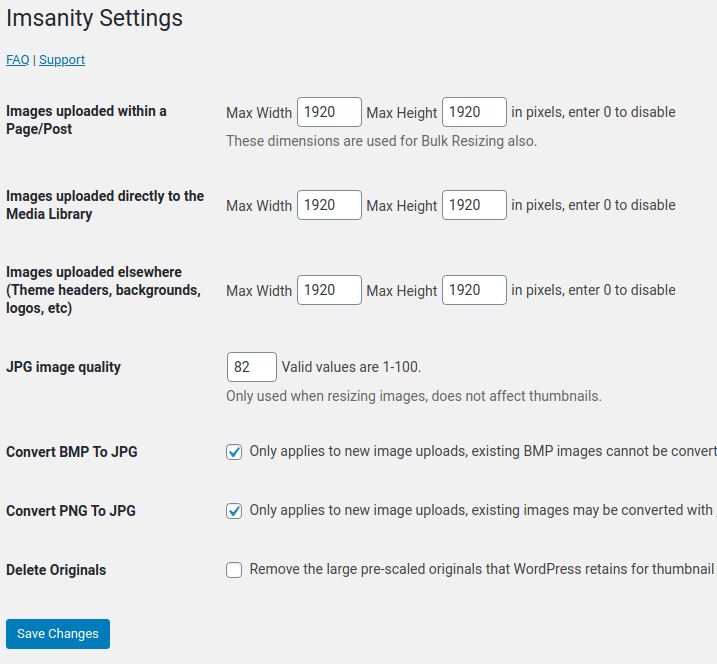
Automatically resize huge image uploads with Imsanity. Choose whatever size and quality you like, and let Imsanity do the rest. When a contributor uploads an image that is larger than the configured size, Imsanity will automatically scale it down to the configured size and replace the original image.
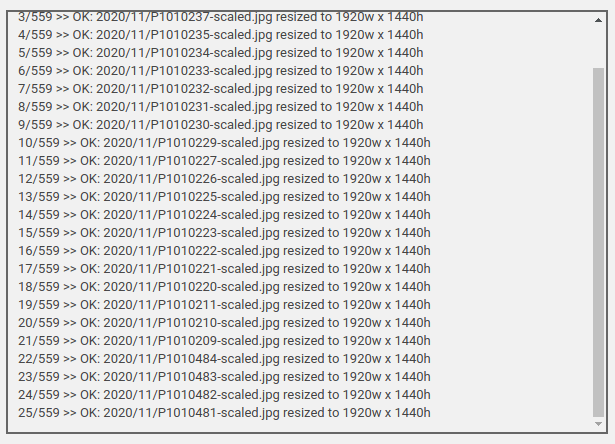
Imsanity also provides a bulk-resize feature to resize previously uploaded images and free up disk space. You may resize individual images from the Media Library’s List View.
This plugin is ideal for blogs that do not require hi-resolution original images to be stored and/or the contributors don’t want (or understand how) to scale images before uploading.
You may report security issues through our Patchstack Vulnerability Disclosure Program. The Patchstack team helps validate, triage and handle any security vulnerabilities. Report a security vulnerability.
Features
Translations
The opening of the plugin's own description. The full text, installation notes and changelog are on its WordPress.org page.
Activating Imsanity will not alter any existing images. Imsanity resizes images as they are uploaded so it does not affect existing images unless you specifically use the “Bulk Image Resize” feature on the Imsanity settings page. The Bulk Resize feature allows you to quickly resize existing images.
WordPress uses the GD library to handle the image manipulation. GD can be installed and configured to support various types of images. If GD is not configured to handle a particular image type then you will get this message when you try to upload it. For more info see http://php.net/manual/en/image.installation.php
You can re-name your file and add “-noresize” to the filename. For example if your file is named “photo.jpg” you can rename it “photo-noresize.jpg” and Imsanity will ignore it, allowing you to upload the full-sized image.
If you are a developer (or have one handy), you can also use the ‘imsanity_skip_image’ filter to bypass resizing for any image.
While Imsanity does compress JPG images in the process of resizing them, it uses the standard WordPress compression. Thus, the resulting images are not efficiently encoded and can be optimized further (without quality loss) by the EWWW Image Optimizer and many other image optimization plugins.
If the images can be found in the Media Library of your site, then it is likely Imsanity will resize them. Imsanity uses the wp_handle_upload hook to process new uploads and can resize any existing images in the Media Library using the Bulk Resizer. If the images are not in the Media Library, you can use the EWWW Image Optimizer to resize them.
Photos taken on any modern camera and most cellphones are too large to display full-size in a browser.
This wastes space on your web server, and wastes bandwidth for your visitors to view these files.
Imsanity allows you to set a sanity limit so that all uploaded images will be constrained to a reasonable size which is still more than large enough for the needs of a typical website.
Release Date – August 20, 2026
#60 by installs
Comprehensive image optimization with WebP, AVIF, Lazy Load, and more. Optimize images automatically for Faster Sites and Happy Visitors.
Compress images & PDFs automatically, convert to WebP & AVIF, and generate SEO-friendly filenames with AI. Bulk optimization, smart crop & resize.

#257 by installs
Formerly Easy Fancybox. The most popular WordPress lightbox plugin. Simple, fast, and responsive. Opens images, videos, PDFs, and custom popups.

#328 by installs
The most popular lightbox plugin and responsive gallery builder for WordPress.

#332 by installs
The highly customizable lightbox for WordPress
reSmush.it is the FREE image compressor and optimizer plugin - use it to optimize your images and improve the SEO and performance of your website.
Read from the WordPress.org plugin API on , when WordPress 7.1.4 was the current release. WordPress.org rounds active installs into buckets. These are the directory's figures, not my verdict, and I haven't tested this plugin. The author takes donations at their donate page.

