
#159 by installs
Photo Gallery, Sliders, Proofing and Themes – NextGEN Gallery
The most popular gallery plugin that lets you create galleries and albums in seconds.
- Installs
- 300,000+
- Rating
- 4.3 (4.3K)
- Updated
- 2 days ago

Create responsive photo, image and masonry galleries in WordPress with FooGallery, plus carousel, lightbox, albums, SEO and video gallery support.
| Last updated | October 19, 2026Updated in the last 3 months |
|---|---|
| Tested up to | WordPress 7.1.4Covers WordPress 7.1.4, the current release |
| Needs WordPress | 6.8 or newer |
| Needs PHP | 7.2 or newer |
| First published | July 10, 2014 |
| Support, last two months | 9 of 11 threads resolved (82%) |
4.8 / 5 from 995 reviews
| 5 stars | 904 |
|---|---|
| 4 stars | 39 |
| 3 stars | 16 |
| 2 stars | 9 |
| 1 star | 27 |
WordPress Gallery Plugin for Photo, Image & Masonry Galleries
FooGallery helps you create fast, responsive WordPress photo galleries, image galleries, masonry galleries, portfolio galleries, albums, and lightbox galleries using a drag-and-drop gallery builder. It is built for site owners, photographers, designers, bloggers, and agencies who need attractive galleries without custom code.
FooGallery Home
Live Gallery Demos
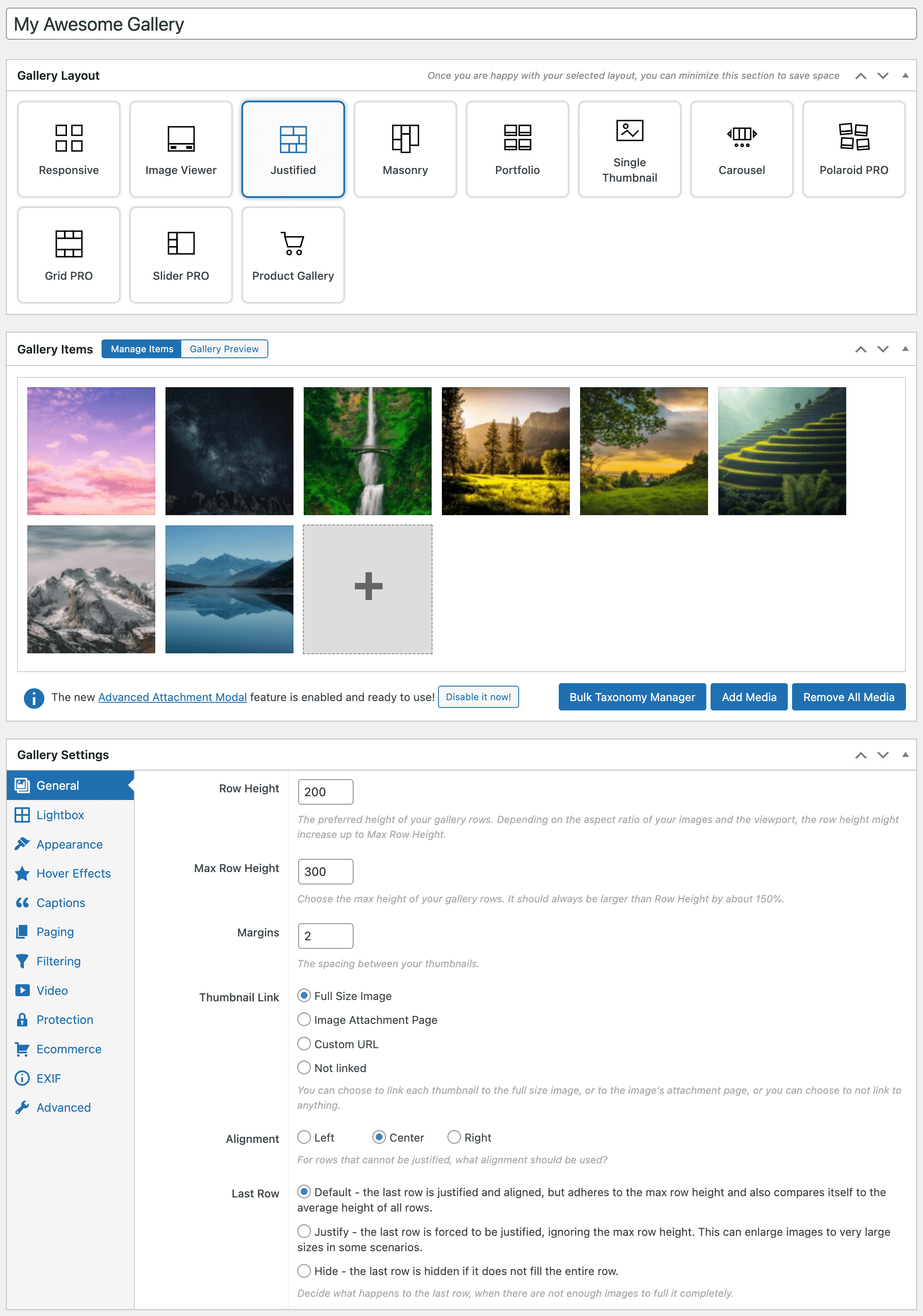
Design galleries with live previews, a visual layout selector, mobile controls, the WordPress block editor, and shortcodes. FooGallery includes seven free gallery layouts including Responsive, Image Viewer, Masonry, Portfolio, Justified, Single Thumbnail, and Carousel. FooGallery Pro adds video galleries, filtering, dynamic galleries, advanced pagination, WooCommerce selling tools, watermarking, mobile settings, and image protection.
Launch Your Own FooGallery Demo (Backend included)
Photo Gallery, Image Gallery, Masonry Gallery and Lightbox Features
Adjust colors, transitions, captions, and controls with fullscreen, thumb strip, auto progress, prev/next, and download button support.
The opening of the plugin's own description. The full text, installation notes and changelog are on its WordPress.org page.
FooGallery has been optimized for performance and has a ton of features in the free version. Read our blog post where we compare FooGallery to other WordPress gallery plugins:
Best WordPress Gallery Plugins Compared
Yes, video galleries are supported in FooGallery PRO Expert. You can import from YouTube, YouTube Shorts, Vimeo or use self-hosted videos.
Yes, that is why we built FooGallery PRO Commerce – it integrates deeply with WooCommerce.
You can build galleries from WooCommerce products, or link every image to a master product. Sell with variations, ribbons, custom buttons, lightbox product info, checkout flows, and image file downloads.
Lazy loading is not working on your gallery. This could be due to a conflict between our plugin and your theme.
You can test this theory by testing a different theme (if possible).
We can help you get it working, by contacting our support.
Sometimes, there are issues when the theme does not follow WordPress best practices.
In order for FooGallery to function properly, the theme needs to have:
* A call to wp_head(); in the header.php file.
* A call to wp_footer(); in the footer.php file.
One way to check if the theme is the problem, is by switching to one of the built-in WordPress themes, and then see if the gallery loads.
Some versions of PHP have issues with the Imagick Image library, which FooGallery uses to generate thumbnails.
To fix this problem, goto FooGallery Settings -> Images, and ensure “Force GD Library” is checked and save settings.
This will force your server to rather use the GD image library to avoid the 503 errors.



#159 by installs
The most popular gallery plugin that lets you create galleries and albums in seconds.

#293 by installs
Photo Gallery is a powerful image gallery plugin with a list of advanced options for creating responsive image galleries with beautiful lightbox.

#382 by installs
Create responsive image galleries with drag-and-drop grid builder. Custom layouts, video support, AI optimization. Works with any theme.

#881 by installs
Robo Gallery is a powerful image gallery and photo gallery plugin with advanced features to create responsive galleries with a beautiful lightbox
The fastest drag & drop photo gallery plugin. Create stunning image galleries, albums, video galleries & lightbox displays in minutes — no coding!

#692 by installs
Build photo galleries, image galleries, and portfolio grids with gallery blocks. Masonry, lightbox, sliders, and filters included.
Read from the WordPress.org plugin API on , when WordPress 7.1.4 was the current release. WordPress.org rounds active installs into buckets. These are the directory's figures, not my verdict, and I haven't tested this plugin. The author takes donations at their donate page.
