
#870 by installs
Virtual Robots.txt
Virtual Robots.txt automatically creates a robots.txt file for your site. Your robots.txt file can be easily edited from the plugin settings page.
- Installs
- 40,000+
- Rating
- 4.3 (10)
- Updated
- 2 months ago

WP Robots Txt Allows you to edit the content of your robots.txt file.
| Last updated | August 24, 2026Updated in the last 3 months |
|---|---|
| Tested up to | WordPress 7.1.4Covers WordPress 7.1.4, the current release |
| Needs WordPress | 5.3.0 or newer |
| Needs PHP | 7.0 or newer |
| First published | March 5, 2012 |
| Support, last two months | No threads opened |
5.0 / 5 from 21 reviews
| 5 stars | 20 |
|---|---|
| 4 stars | 1 |
| 3 stars | 0 |
| 2 stars | 0 |
| 1 star | 0 |
WordPress, by default, includes a simple robots.txt file that’s dynamically generated from within the WP application. This is great, but how do you easily change the content?
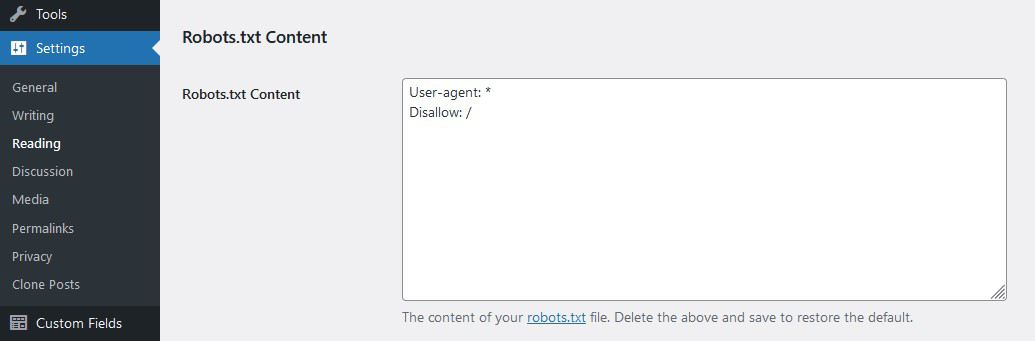
Enter WP Robots Txt, a plugin that adds an additional field to the “Reading” admin page where you can do just that. No manual coding or file editing required!
Simply visit https://your-site.com/wp-admin/options-reading.php and you can control the contents of your https://your-site.com/robots.txt
Changelog
The opening of the plugin's own description. The full text, installation notes and changelog are on its WordPress.org page.
Delete all the content from the Robots.txt Content field and save the privacy options.
Yes. Be careful! That said, robots.txt files are suggestions. They don’t really block bots as much as they suggest that bots don’t crawl portions of a site. That’s why the options on the Privacy Settings page say “Ask search engines not to index this site.”
No. Since WordPress 5.3 that setting adds a noindex meta tag. It does not add Disallow: / to robots.txt. Your saved rules are still served. Add Disallow: / yourself if you want crawlers to skip the site.
WordPress only serves the virtual robots.txt when there is no physical robots.txt file in the site root. Delete or rename that file to use this plugin.
Here is a general guide by Google and here is the WordPress SEO documentation.
#870 by installs
Virtual Robots.txt automatically creates a robots.txt file for your site. Your robots.txt file can be easily edited from the plugin settings page.
Real-time SEO guidance, schema, and AI built in. Help search engines and AI systems understand your content. All AI tools included, no hidden fees.

#5 by installs
All-in-one unbeatable acceleration & PageSpeed improvement: caching, image/CSS/JS optimization...

#13 by installs
Grow your organic traffic and AI visibility with powerful SEO tools, XML sitemaps, Schema automation, and built-in AI SEO, all in one place.

AIOSEO is the WordPress SEO plugin. Boost SEO rankings with AI SEO tools, schema, meta descriptions, XML sitemaps & rank tracking.

#56 by installs
Generate multiple types of sitemaps to improve SEO and get your website indexed quickly.
Read from the WordPress.org plugin API on , when WordPress 7.1.4 was the current release. WordPress.org rounds active installs into buckets. These are the directory's figures, not my verdict, and I haven't tested this plugin. The author takes donations at their donate page.
