
#77 by installs
Autoptimize
Autoptimize speeds up your website by optimizing JS, CSS, images (incl. lazy-load), HTML and Google Fonts, asyncing JS, removing emoji cruft and more.
- Installs
- 800,000+
- Rating
- 4.7 (1.4K)
- Updated
- 6 days ago

The simplest and fastest WP Cache system
| Last updated | October 10, 2026Updated in the last 3 months |
|---|---|
| Tested up to | WordPress 7.1.4Covers WordPress 7.1.4, the current release |
| Needs WordPress | 5.7 or newer |
| Needs PHP | Not stated |
| First published | August 4, 2013 |
| Support, last two months | 5 of 12 threads resolved (42%) |
4.9 / 5 from 4,228 reviews
| 5 stars | 4,018 |
|---|---|
| 4 stars | 49 |
| 3 stars | 31 |
| 2 stars | 27 |
| 1 star | 103 |
Official Website
You can find more information on our website (wpfastestcache.com)
Welcome to the page of the WP Fastest Cache plugin, a WordPress cache plugin developed to speed up WordPress sites.
In today’s world where every second counts, optimizing your website’s performance is very important. Meet WP Fastest Cache, your caching plugin that you can use to speed up WordPress websites.
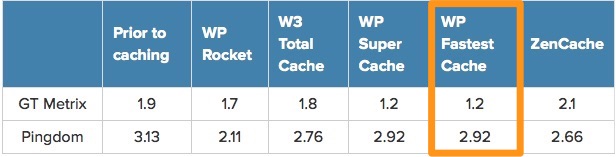
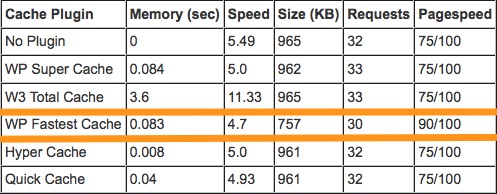
Optimize the performance of your website with WP Fastest Cache. Improve Google PageSpeed, Core Web Vitals, GTmetrix and Pingdom score with our wp cache plugin.
In addition, page speed is a ranking factor in Google’s search algorithm. Therefore, using cache plugins helps improve your SEO ranking. Our WordPress optimization plugin not only accelerates your site but also boosts SEO rankings.
Features
The opening of the plugin's own description. The full text, installation notes and changelog are on its WordPress.org page.
You need to refresh a page twice. If a page is cached, at the bottom of the page there is a text like “<!– WP Fastest Cache file was created in 0.330816984177 seconds, on 08-01-14 9:01:35 –>”.
Yes, it works with Nginx properly. Since Nginx doesn’t use an .htaccess file, you need to enable the Gzip compression and Browser Caching features manually. You can follow these tutorials: How to Enable Leverage Browser Caching on Nginx and How to Enable Gzip on Nginx
Yes, it works with IIS properly.
Yes, it is compatible with Multisite.
Yes, it is compatible with Subdirectory Installation.
Yes, it is compatible with Http Secure (https).
#77 by installs
Autoptimize speeds up your website by optimizing JS, CSS, images (incl. lazy-load), HTML and Google Fonts, asyncing JS, removing emoji cruft and more.

#324 by installs
Aruba HiSpeed Cache interfaces directly with an Aruba hosting platform's HiSpeed Cache service and automates its management.
Speed up your site with 10Web Booster. Pass Core Web Vitals by optimizing HTML / CSS / JavaScript, Image Optimization, Lazy Loading, Cache, Google Fon …

#741 by installs
Turns on site high speed to be attractive for people and search engines.
Optimize and tweak WordPress by disable unused features. Improve performance, SEO and security using Clearfy — super easy, fast and zero code.

#5 by installs
All-in-one unbeatable acceleration & PageSpeed improvement: caching, image/CSS/JS optimization...
Read from the WordPress.org plugin API on , when WordPress 7.1.4 was the current release. WordPress.org rounds active installs into buckets. These are the directory's figures, not my verdict, and I haven't tested this plugin. The author takes donations at their donate page.

