
#201 by installs
WP Rollback – Rollback Plugins and Themes
Roll back (or forward) any WordPress.org plugin, theme, or block like a boss.
- Installs
- 200,000+
- Rating
- 4.9 (215)
- Updated
- 23 days ago
Automatically downgrad or update to any WordPress version you want directly from the backend.
| Last updated | October 7, 2026Updated in the last 3 months |
|---|---|
| Tested up to | WordPress 7.1.4Covers WordPress 7.1.4, the current release |
| Needs WordPress | 3.0.1 or newer |
| Needs PHP | Not stated |
| First published | April 30, 2016 |
| Support, last two months | No threads opened |
4.8 / 5 from 169 reviews
| 5 stars | 157 |
|---|---|
| 4 stars | 4 |
| 3 stars | 0 |
| 2 stars | 0 |
| 1 star | 8 |
WordPress Core Downgrade/Update
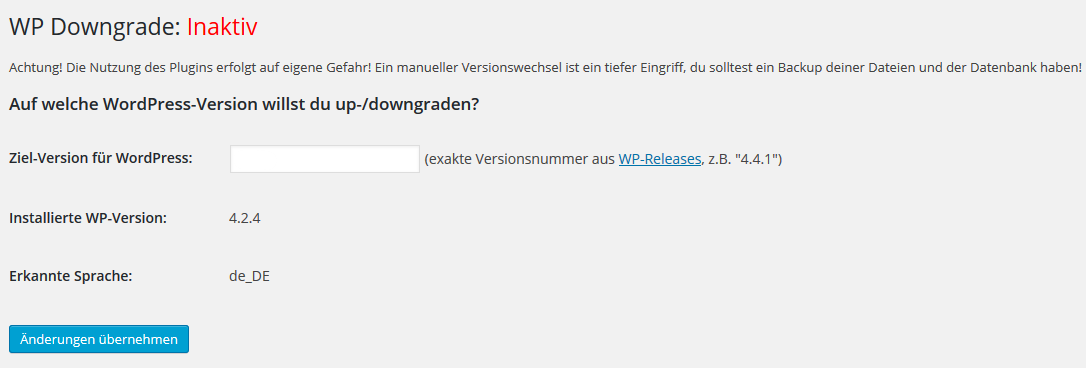
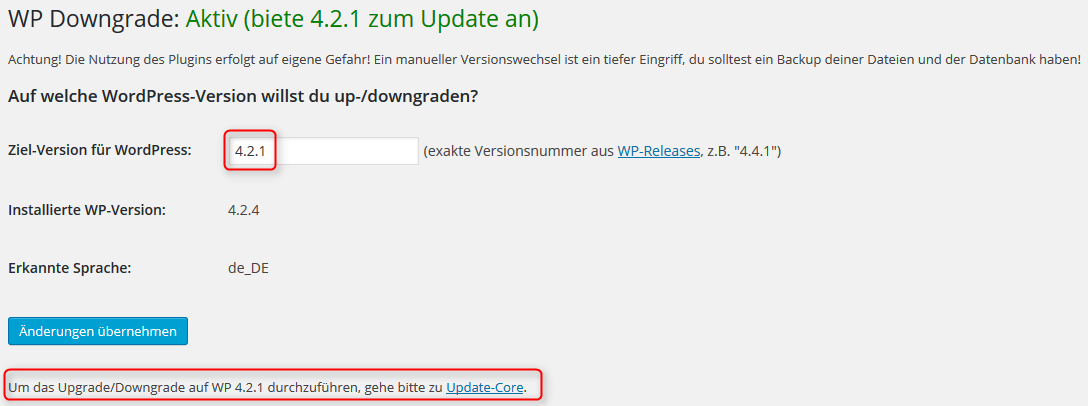
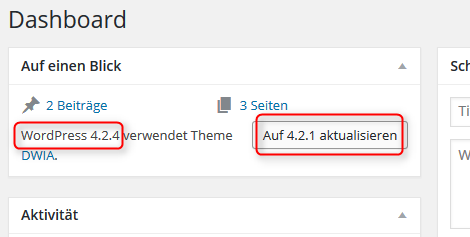
EN: The plugin “WP Downgrade” forces the WordPress update routine to perform the installation of a specified WordPress release. The Core Release you specify is then downloaded from wordpress.org and installed as would any regular update. You can permanently stay on a previous version of your choice or update selected.
The user Gahapati describes it so much better than I can. (Thank you!)
WP Downgrade | Specific Core Version has the potential for becoming one of the best-loved plugins among those, who simply cannot update to the latest WP release.
In the past the latest WP release was the only offering for WP’s Automatic Update routine. This left all those behind, who have to wait with Core updates, until their plugins become compatible with newer WP releases. When this finally happens, more often than not there has already been yet another Core update. In the end a dreaded, cumbersome, time-consuming and error-prone Manual Update used to be the only way to go.
With WP Downgrade | Specific Core Version this is now a thing of the past. Anyone who lags behind the latest WP release is now able to use Automatic Updates even to lower WP versions. What WP Downgrade does simply is to make WP believe that the version you want to update to actually is the latest version. Because of this, there is no difference to updating to the latest version.
The opening of the plugin's own description. The full text, installation notes and changelog are on its WordPress.org page.
A: If there is no button for update/reinstall core on /wp-admin/update-core.php, this is being blocked by a custom code. Can be another plugin or your theme. Maybe you try something like this:
#201 by installs
Roll back (or forward) any WordPress.org plugin, theme, or block like a boss.

#268 by installs
Make sure your plugins and themes are compatible with newer PHP versions.

#788 by installs
Change the WordPress admin email without requiring email confirmation - perfect for development and testing environments.

#994 by installs
Displays the currently installed PHP/MySQL version in the "At a Glance" admin dashboard widget.
Read from the WordPress.org plugin API on , when WordPress 7.1.4 was the current release. WordPress.org rounds active installs into buckets. These are the directory's figures, not my verdict, and I haven't tested this plugin. The author takes donations at their donate page.