
Advanced Shipment Tracking for WooCommerce
The #1 WooCommerce shipment tracking plugin. Add tracking numbers, auto-update order status & send branded shipping notifications. 1010+ carriers.
- Active installs
- 70,000+
- #607 of 1,000
- Downloads, all time
- 2.8M
- 2,834,465
- Downloads, 30 days
- 77.5K
- 28.1K in the last 7
- Rating
- 4.5 / 5
- 355 reviews
- Last updated
- 2 days ago
- Oct 29, 2026
- Version
- 4.0.6
- 44 releases
Upkeep and compatibility
| Last updated | October 29, 2026Updated in the last 3 months |
|---|---|
| Tested up to | WordPress 7.1.4Covers WordPress 7.1.4, the current release |
| Needs WordPress | 5.3 or newer |
| Needs PHP | 7.2 or newer |
| Needs plugins | woocommerce |
| First published | October 23, 2018 |
| Support, last two months | 9 of 9 threads resolved (100%) |
Reviews
4.5 / 5 from 355 reviews
| 5 stars | 305 |
|---|---|
| 4 stars | 5 |
| 3 stars | 5 |
| 2 stars | 5 |
| 1 star | 35 |
Downloads, last 30 days
What the author says it does
Trusted by 70,000+ WooCommerce stores worldwide. Advanced Shipment Tracking (AST) is the #1 WooCommerce shipment tracking plugin. Add tracking numbers to orders and automatically share them with customers — stopping “Where is my order?” support tickets before they start and keeping shoppers informed from checkout to delivery.
When you ship an order, your customer instantly gets a tracking link in their order email and on their My Account > Orders page. No external accounts. No complex setup. No monthly fees.
HPOS Compatible · Block Checkout Compatible · 1010+ Carriers · Free & Open Source
Why 70,000+ Stores Choose AST
Whether you ship 5 orders a day or 5,000, AST fits your workflow without adding complexity.
- Add Tracking Numbers Instantly — Add one or multiple tracking numbers per order from the Edit Order page or the order list. Takes seconds.
- “Shipped” & “Partially Shipped” Statuses — Replace the default “Completed” status with “Shipped” and use “Partially Shipped” for split shipments, so customers always know the status of their order.
- Customizable Tracking Widget — A responsive tracking widget appears in order emails and on My Account > Orders. Customize colors, layout, and content with a live preview customizer — no code required.
The opening of the plugin's own description. The full text, installation notes and changelog are on its WordPress.org page.
Questions the author answers
How is AST different from the official WooCommerce Shipment Tracking extension?
AST is built for store owners who want a real fulfillment workflow, not just a basic tracking link. Compared to the official WooCommerce Shipment Tracking extension, AST adds: 1010+ pre-configured shipping carriers (vs ~50), a customizable tracking widget with live preview, a complete Shipped / Partially Shipped fulfillment workflow, bulk CSV import, a Shipment Tracking REST API, and automatic data migration.
I’m migrating from WooCommerce Shipment Tracking (by WooCommerce). Will my data carry over?
Yes. When you activate AST, it automatically detects and migrates existing shipment tracking data from the official WooCommerce Shipment Tracking extension. Your customers won’t lose access to any tracking information.
How do I add a tracking number to a WooCommerce order?
Open any order from WooCommerce > Orders. You’ll see a Shipment Tracking panel. Select your shipping carrier, enter the tracking number, and save. The tracking info and a clickable “Track” link will appear in the customer’s order confirmation email and on their My Account > Orders page immediately.
Where do my customers see their tracking information?
Tracking details appear in two places: in the order status email (when the order is marked as Shipped or Completed) and on the customer’s My Account > View Order page. Guest customers can also view tracking by entering their email and order ID on the WooCommerce order tracking page.
Can I add multiple tracking numbers to one order?
Yes. You can add as many tracking numbers as needed to a single order — for example, when an order ships in multiple packages. All tracking entries will be displayed to your customer in their order email and on My Account.
Does AST work with ShipStation?
Yes. AST integrates with ShipStation. In AST PRO, tracking numbers from ShipStation shipments are automatically imported to the matching WooCommerce order as soon as the label is created — no manual copy-paste needed. In AST Free, you can import ShipStation tracking numbers using the built-in CSV import tool.
Latest changelog entry
- Fix – Settings page could fail to load with a fatal error after an incomplete plugin update.
- Fix – CSV import reported rows as successful when they had actually failed. Rows that fail, and lines skipped from the file, are now listed in the import result.
Screenshots
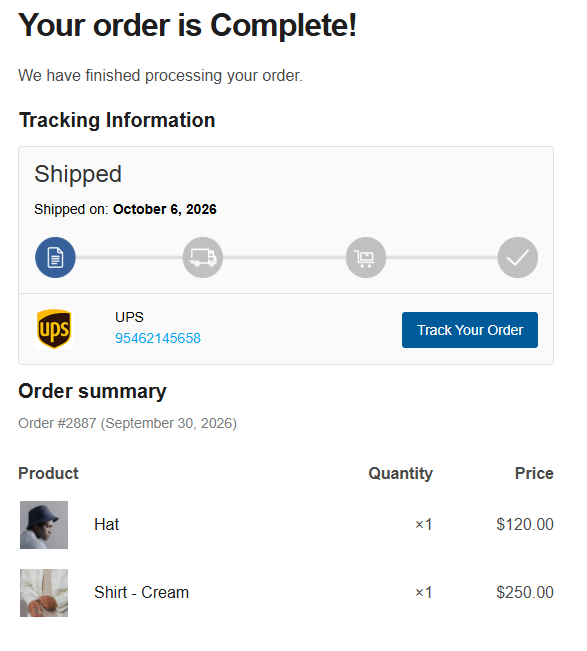
The shipment tracking widget in your customer's order email — carrier logo, tracking number, shipped date and a one-click Track Order… 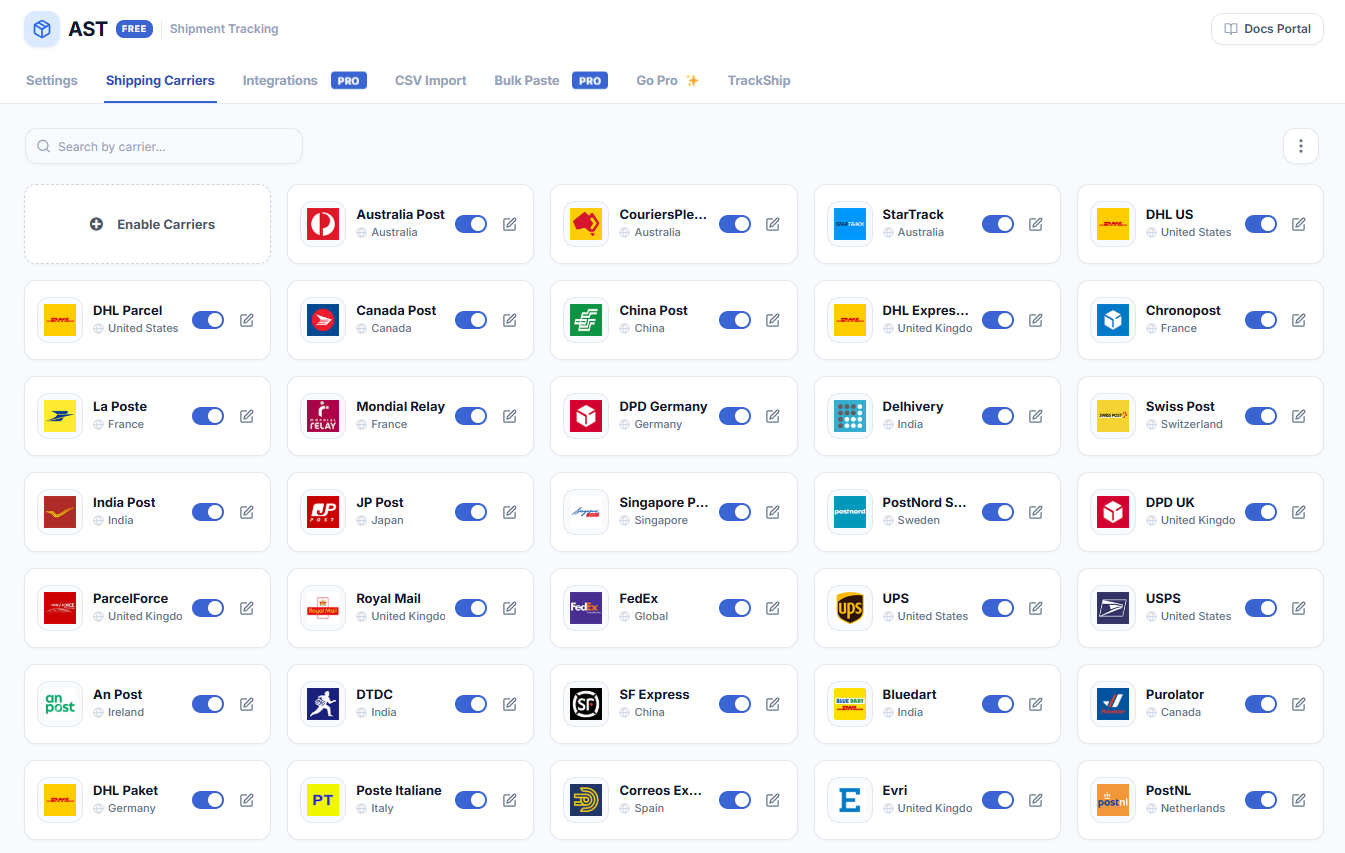
1010+ pre-configured shipping carriers worldwide, from USPS, UPS, FedEx and DHL to Australia Post, India Post, La Poste and Japan Post.… 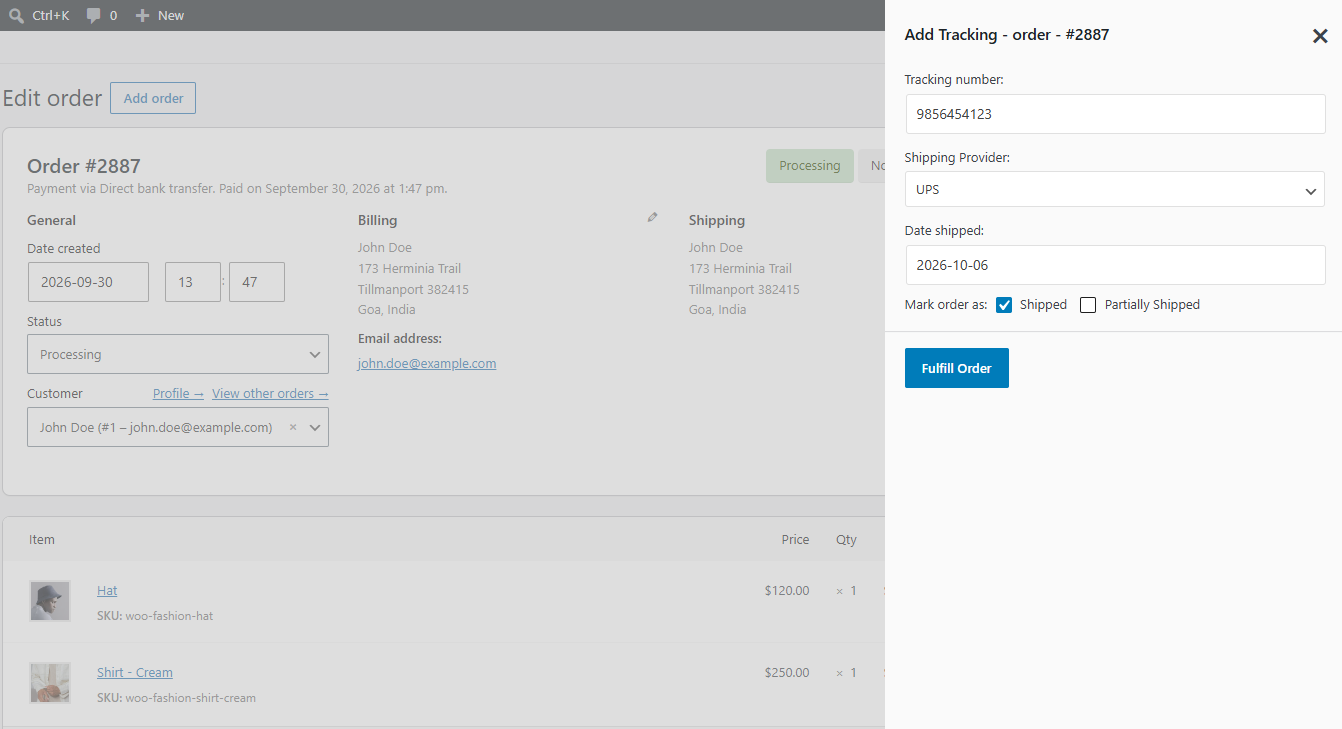
Add a tracking number to any WooCommerce order in seconds — pick the carrier, enter the number, and mark the order Shipped. The customer… 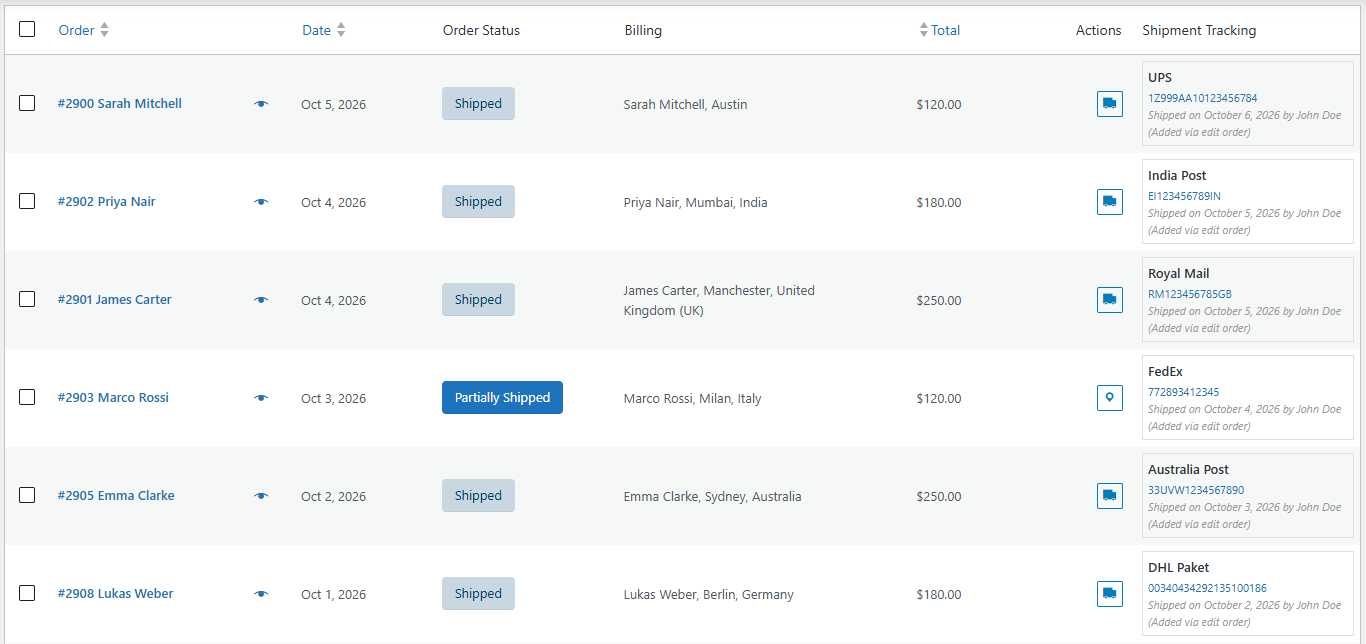
See tracking for every order at a glance: the Shipment Tracking column on the WooCommerce orders list shows the carrier, tracking number…
Tagged
Where this page's numbers come from
Read from the WordPress.org plugin API on , when WordPress 7.1.4 was the current release. WordPress.org rounds active installs into buckets. These are the directory's figures, not my verdict, and I haven't tested this plugin.