
#485 by installs
Advanced Custom Fields: Font Awesome Field
Adds a new 'Font Awesome Icon' field to the popular Advanced Custom Fields plugin.
- Installs
- 90,000+
- Rating
- 4.9 (36)
- Updated
- 2 months ago

Add icons to WordPress navigation menus easily — pick from Font Awesome, Dashicons, image icons & more. Style menu items with custom colors & sizes.
| Last updated | September 29, 2026Updated in the last 3 months |
|---|---|
| Tested up to | WordPress 7.1.4Covers WordPress 7.1.4, the current release |
| Needs WordPress | 4.7 or newer |
| Needs PHP | Not stated |
| First published | February 20, 2014 |
| Support, last two months | 2 of 2 threads resolved (100%) |
4.9 / 5 from 851 reviews
| 5 stars | 794 |
|---|---|
| 4 stars | 33 |
| 3 stars | 11 |
| 2 stars | 1 |
| 1 star | 12 |
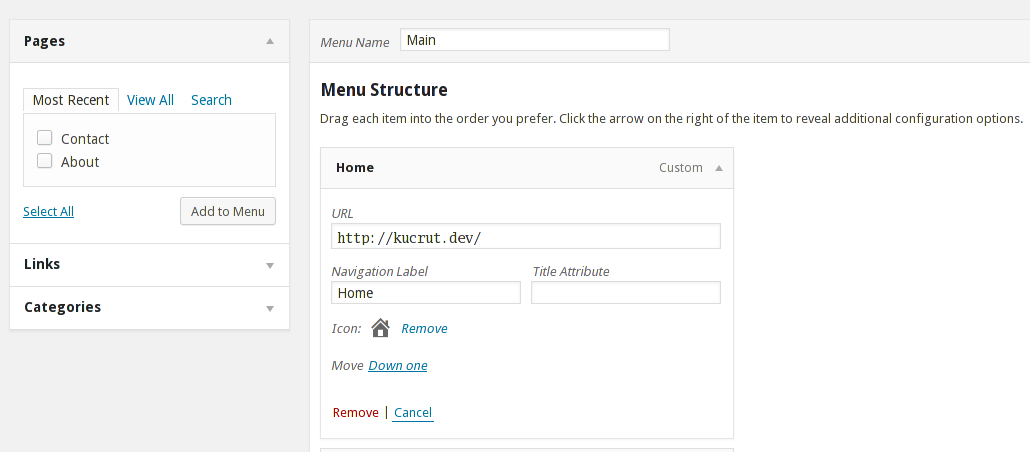
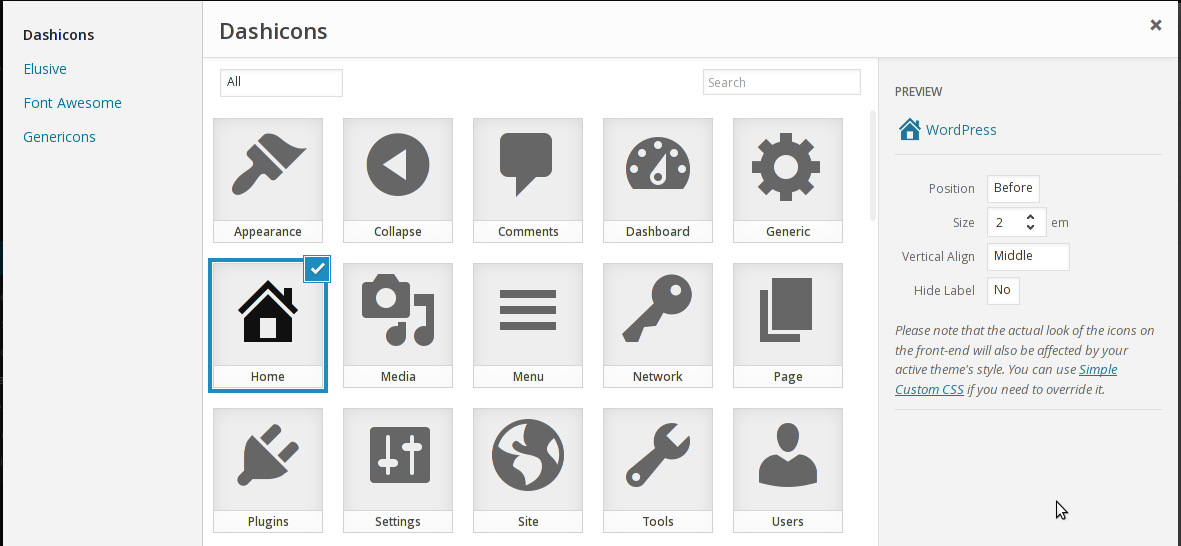
This plugin gives you the ability to add icons to your menu items, similar to the look of the latest dashboard menu.
Usage
Supported icon types
Planned supported icon types
Compatible themes
Menu icons works with most of the themes out there, especially with popular ones like Twenty Seventeen or Hestia.
Development of this plugin is done on GitHub. Pull requests welcome. Please see issues reported there before going to the plugin forum.
If you like this plugin, then consider checking out our other projects:
CodeinWP Blog – Designer’s Guide To WordPress
Revive.Social – Social Media Tools
JustFreeThemes – Free WordPress Themes directory
The opening of the plugin's own description. The full text, installation notes and changelog are on its WordPress.org page.
Make sure that your active theme is using the default walker for displaying the nav menu. If it’s using its own custom walker, make sure that the menu item titles are filterable (please consult your theme author about this).
If you’re comfortable with editing your theme stylesheet, then you can override the styles from there.
If you have Jetpack installed, you can also use its Custom CSS module.
Otherwise, I recommend you to use the Advanced CSS plugin.
This is a bug with the font icon itself. When the font is updated, this plugin will update its font too.
You can use the icon_picker_icon_type_stylesheet_uri filter, eg:
/** * Load Font Awesome's CSS from CDN * * @param string $stylesheet_uri Icon type's stylesheet URI. * @param string $icon_type_id Icon type's ID. * @param Icon_Picker_Type_Font $icon_type Icon type's instance.
Certainly! Here’s how you can remove an icon type from your plugin/theme:
/** * Remove one or more icon types * * Uncomment one or more line to remove icon types * * @param array $types Registered icon types. * @return array */ function my_remove_menu_icons_type( $types ) { // Dashicons //unset( $types['dashicons'] );
// Elusive //unset( $types['elusive'] );
// Font Awesome //unset( $types['fa'] );
Add this block of code to your mu-plugin file:
add_filter( 'menu_icons_disable_settings', '__return_true' );
- Updated internal dependencies: Enhanced performance and security.
Version 0.13.12 (2024-04-01)


#485 by installs
Adds a new 'Font Awesome Icon' field to the popular Advanced Custom Fields plugin.

#631 by installs
Add Font Awesome Free icons that stay current automatically, with a native WordPress block, shortcodes, a Classic Editor picker, and legacy support.
Read from the WordPress.org plugin API on , when WordPress 7.1.4 was the current release. WordPress.org rounds active installs into buckets. These are the directory's figures, not my verdict, and I haven't tested this plugin.