
#290 by installs
Search Regex
Search Regex adds a powerful set of search and replace functions to WordPress posts, pages, custom post types, and other data.
- Installs
- 100,000+
- Rating
- 4.7 (101)
- Updated
- 25 days ago

Easily replace any attached image/file by simply uploading a new file in the Media Library edit view - a real time saver!
| Last updated | October 26, 2026Updated in the last 3 months |
|---|---|
| Tested up to | WordPress 7.1.4Covers WordPress 7.1.4, the current release |
| Needs WordPress | 4.9.7 or newer |
| Needs PHP | 5.6 or newer |
| First published | June 1, 2009 |
| Support, last two months | 2 of 4 threads resolved (50%) |
4.4 / 5 from 302 reviews
| 5 stars | 241 |
|---|---|
| 4 stars | 13 |
| 3 stars | 10 |
| 2 stars | 6 |
| 1 star | 32 |
A free, lightweight and easy to use plugin that allows you to seamlessly replace an image or file in your Media Library by uploading a new file in its place. No more deleting, renaming and re-uploading files! Now fully compatible with WP Offload Media!
New beta feature! You can now remove the background of your images for better integration with eCommerce solutions!
Supported by the friendly team that created ShortPixel 🙂
A real timesaver
Don’t you find it tedious and complicated to first delete a file and then upload another one with the exact same name every time you want to update an image or other uploaded file in the WordPress media library?
Well, no longer!
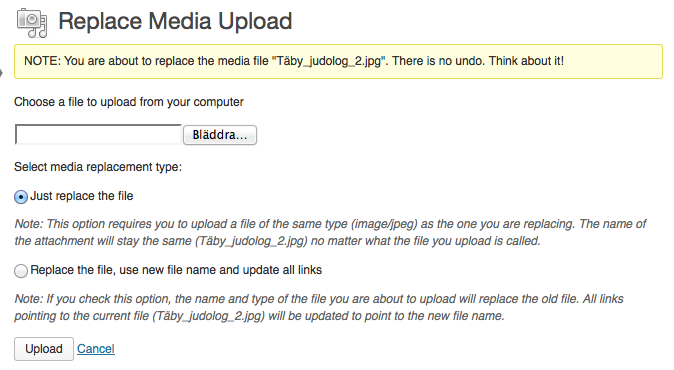
Now you can replace any uploaded file in the Edit Media view, where it should be. Replacing Media can be done in two ways:
It’s simple to replace a file
The opening of the plugin's own description. The full text, installation notes and changelog are on its WordPress.org page.
Please report security bugs found in the source code of the Enable Media Replace plugin through the Patchstack Vulnerability Disclosure Program. The Patchstack team will assist you with verification, CVE assignment, and notify the developers of this plugin.= What does this plugin actually do? =
This plugin makes it easy to update/replace files that have been uploaded to the WordPress Media Library.
A new option will be available in the Edit Media view, called “Replace Media”. This is where you can upload a new file to replace the old one.
There are two main reasons this would happen.
First, make sure you are not viewing a cached version of the file, especially if you replaced an image. Press “Refresh” in your browser to make sure.
Second, if the file really looks unchanged, make sure WordPress has write permissions to the files in your uploads folder.
Release date: October 26, 2026
* Fix: Hardened the database replacements against a possible PHP Object Injection, which could be exploited under certain conditions, safely disclosed by the Wordfence, PatchStack and WPScan teams;
* Fix: Users with the Author role now only see the standard replace option; renaming, changing the location and background removal are limited to Editors and above, following a security report from the Wordfence team;



#290 by installs
Search Regex adds a powerful set of search and replace functions to WordPress posts, pages, custom post types, and other data.

#362 by installs
Search & Replace data in your database with WordPress admin, replace domains/URLs of your WordPress installation.

#587 by installs
Set up find and replace rules that are executed AFTER a page is generated by WordPress, but BEFORE it is sent to a user's browser.

#649 by installs
Remove or change footer credits or any text or HTML without modifying code.
Read from the WordPress.org plugin API on , when WordPress 7.1.4 was the current release. WordPress.org rounds active installs into buckets. These are the directory's figures, not my verdict, and I haven't tested this plugin. The author takes donations at their donate page.