
#354 by installs
Modern Image Formats
Converts images to more modern formats such as WebP or AVIF during upload.
- Installs
- 100,000+
- Rating
- 3.6 (26)
- Updated
- 2 months ago

Serve autogenerated WebP images instead of jpeg/png to browsers that supports WebP.
| Last updated | October 18, 2026Updated in the last 3 months |
|---|---|
| Tested up to | WordPress 6.9.11Older than WordPress 7.1.4, the current release |
| Needs WordPress | 4.0 or newer |
| Needs PHP | 5.6 or newer |
| First published | August 1, 2018 |
| Support, last two months | 0 of 4 threads resolved (0%) |
4.4 / 5 from 162 reviews
| 5 stars | 131 |
|---|---|
| 4 stars | 6 |
| 3 stars | 2 |
| 2 stars | 7 |
| 1 star | 16 |
More than 9 out of 10 users are using a browser that is able to display webp images. Yet, on most websites, they are served jpeg images, which are typically double the size of webp images for a given quality. What a waste of bandwidth! This plugin was created to help remedy that situation. With little effort, WordPress admins can have their site serving autogenerated webp images to browsers that supports it, while still serving jpeg and png files to browsers that does not support webp.
The image converter
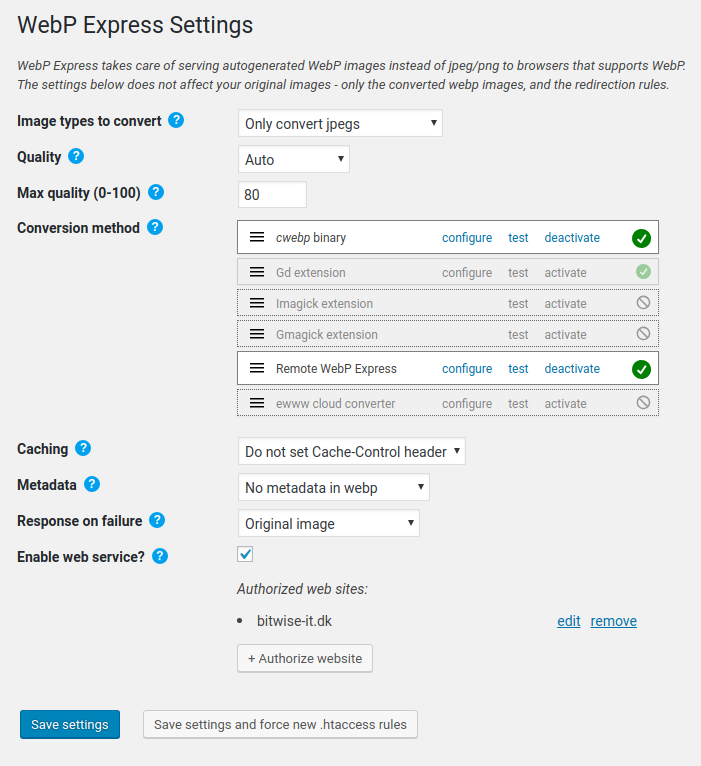
The plugin uses the WebP Convert library to convert images to webp. WebP Convert is able to convert images using multiple methods. There are the “local” conversion methods: imagick, cwebp, vips, gd. If none of these works on your host, there are the cloud alternatives: ewww (paid) or connecting to a WordPress site where you got WebP Express installed and you enabled the “web service” functionality.
The “Serving webp to browsers that supports it” part.
The plugin supports different ways of delivering webps to browsers that supports it:
The opening of the plugin's own description. The full text, installation notes and changelog are on its WordPress.org page.
Verifying that the plugin works in “Varied image responses” mode
1. Make sure at least one of the conversion methods are working. It should have a green checkmark next to it.
2. If you haven’t saved yet, click “Save settings”. This will put redirection rules into .htaccess files in the relevant directories (typically in uploads, themes and wp-content/webp-express/webp-images, depending on the “Scope” setting)
Don’t fret – you have options!
Actually, you might be mistaking, so first, make sure that you didn’t make the very common mistake of thinking that something with the URL example.com/image.jpg must be a jpeg image. The plugin serves webp images on same URL as the original (unconverted) images, so do not let appearances fool you! Confused? See next FAQ item.
Easy enough. Browsers looks at the content type header rather than the URL to determine what it is that it gets. So, although it can be confusing that the resource at example.com/image.jpg is a webp image, rest assured that the browsers are not confused. To determine if the plugin is working, you must therefore examine the content type response header rather than the URL.
Well, first, if you don’t know WP CLI, here is a quick start
WebP Express currently supports commands for converting and flushing webp images throug the CLI. You can use the –help option to learn about the options:
wp webp-express –help. Displays the available commands
wp webp-express convert –help. Displays the available options for the “convert” command.
A few examples:
WebP Express has three ways of distributing webp to webp-enabled browsers while still sending the originals to webp-disabled browsers. While method 1 can be combined with any of the other methods, you would usually just pick method 1 or one of the others if method 1 cannot be used for you.
Can some of these go wrong?
Yes. All!
Method 1: Varied image responses
(released 18 Oct 2026)
* Fixed vulnerability in dom parser library used for altering html. Credit goes to Jakub Herman for discovering the problem. Also fixed a loophole that made it possible to use the web service (if activated) with carefully crafted inputs, even without an api key. Thanks to the third party that found and reported this to the WordPress security team – and thanks to the security team for bringing the issue to my attention
#354 by installs
Converts images to more modern formats such as WebP or AVIF during upload.

#77 by installs
Autoptimize speeds up your website by optimizing JS, CSS, images (incl. lazy-load), HTML and Google Fonts, asyncing JS, removing emoji cruft and more.

#416 by installs
A lightweight caching plugin for WordPress that makes your website faster by generating static HTML files.

#663 by installs
Displays placeholders based on an image's dominant color while the image is loading.

#784 by installs
Improvements for responsive images in WordPress.

#5 by installs
All-in-one unbeatable acceleration & PageSpeed improvement: caching, image/CSS/JS optimization...
Read from the WordPress.org plugin API on , when WordPress 7.1.4 was the current release. WordPress.org rounds active installs into buckets. These are the directory's figures, not my verdict, and I haven't tested this plugin. The author takes donations at their donate page.