
Simple Author Box
Add a responsive author box or guest author box with social icons to any post. Great author box for any site!
- Active installs
- 90,000+
- #492 of 1,000
- Downloads, all time
- 1.8M
- 1,821,663
- Downloads, 30 days
- 15.5K
- 3.8K in the last 7
- Rating
- 4.3 / 5
- 115 reviews
- Last updated
- 3 months ago
- Aug 16, 2026
- Version
- 2.61
- 56 releases
Upkeep and compatibility
| Last updated | August 16, 2026Updated in the last 3 months |
|---|---|
| Tested up to | WordPress 7.1.4Covers WordPress 7.1.4, the current release |
| Needs WordPress | 4.6 or newer |
| Needs PHP | 5.6 or newer |
| First published | August 8, 2014 |
| Support, last two months | 1 of 1 threads resolved (100%) |
Reviews
4.3 / 5 from 115 reviews
| 5 stars | 83 |
|---|---|
| 4 stars | 10 |
| 3 stars | 5 |
| 2 stars | 4 |
| 1 star | 13 |
Downloads, last 30 days
What the author says it does
Simple Author Box adds a responsive author box at the end of your posts, showing the author name, author gravatar and author description – author bio. It also adds over 30 social profile fields on WordPress user profile screen, allowing to display the author social icons in the author box.
Having problems with spam, bots, or AI scrapers? Have a look at our free Captcha plugin used on over 200,000 sites.
Main Features
- Shows author gravatar, name, website, description (author bio) and social icons
- Fully customizable to match your theme design (style, color, size and text options)
- Nice looking on desktop, laptop, tablet or mobile phones
- Automatically insert the author box at the end of your post
- Option to manually insert the author box on your template file (single.php or author.php)
- Simple Author Box has RTL support
- Simple Author Box has AMP support
- Great for guest posts, and guest authors
- GDPR compatible Bunny Fonts
Simple Author Box Pro Features
Premium features only available in Simple Author Box Pro
- Change author box position to before/after content
- Choose whether the author’s name should link to its website/page/none
- Select where to show author box on
- Add rotate effect on author avatar hover
- Option to open author website link in a new tab
- Option to add “nofollow” attribute on author website link
The opening of the plugin's own description. The full text, installation notes and changelog are on its WordPress.org page.
Questions the author answers
Why does the author box not display on a page?
The Simple Author Box plugin was designed to display the author information on posts, categories, tags, etc. The plugin does not work on pages – it was not designed for this, unfortunately. Adding the shortcode on a blog page will also not work because the plugin won’t have author information to display/will not know which author information to display.
What should I add for Whatsapp ?
You should add there your phone number, for more information read this
What should I add for Telegram ?
You should add there your username, for more information read this
Can I remove the SAB from WooCommerce/Category/Tags pages? Can I have only on posts?
The PRO version of Simple Author Box fixes this.
Is there any widget in Simple Author Box ?
Yes, but we also have two awesome widgets in the PRO version.
I have two author boxes. How can I hide one?
The second author box might be a theme feature and you will need to turn it off from your theme’s options, or hide it with custom CSS.
Latest changelog entry
- 2026-07-19
- Minor fixes
Screenshots
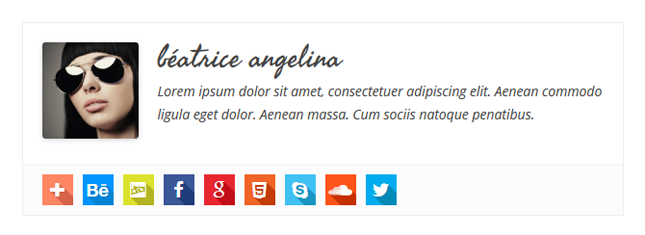
Simple Author Box - Colored icons - squares 
Simple Author Box - Colored icons - circles 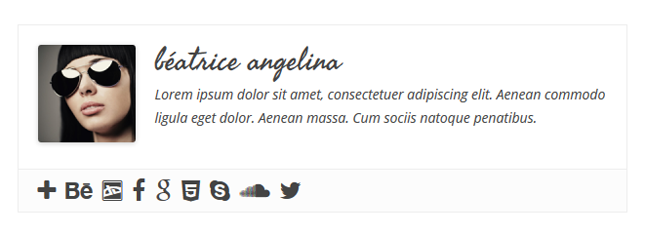
Simple Author Box - Grey icons - author square 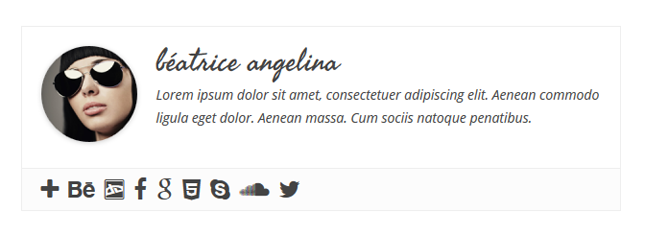
Simple Author Box - Grey icons - author circle
Tagged
Where this page's numbers come from
Read from the WordPress.org plugin API on , when WordPress 7.1.4 was the current release. WordPress.org rounds active installs into buckets. These are the directory's figures, not my verdict, and I haven't tested this plugin.