
#600 by installs
Title Remover
Gives you the ability to hide the title of any post, page or custom post type item without affecting menus or titles in the admin area.
- Installs
- 70,000+
- Rating
- 3.9 (68)
- Updated
- 5 years ago

Hide titles on individual pages, posts and public custom post types.
| Last updated | September 25, 2026Updated in the last 3 months |
|---|---|
| Tested up to | WordPress 7.1.4Covers WordPress 7.1.4, the current release |
| Needs WordPress | 4.1 or newer |
| Needs PHP | 5.6 or newer |
| First published | July 25, 2017 |
| Support, last two months | 1 of 1 threads resolved (100%) |
3.6 / 5 from 54 reviews
| 5 stars | 32 |
|---|---|
| 4 stars | 3 |
| 3 stars | 1 |
| 2 stars | 4 |
| 1 star | 14 |
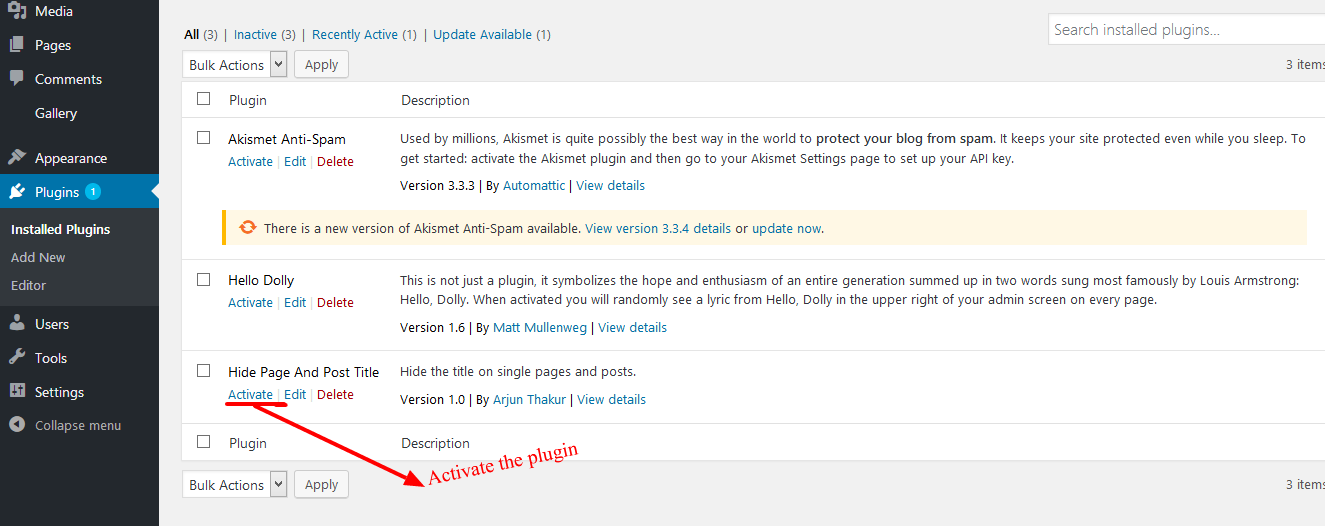
Hide Page And Post Title allows you to hide the title of individual pages, posts and public custom post types.
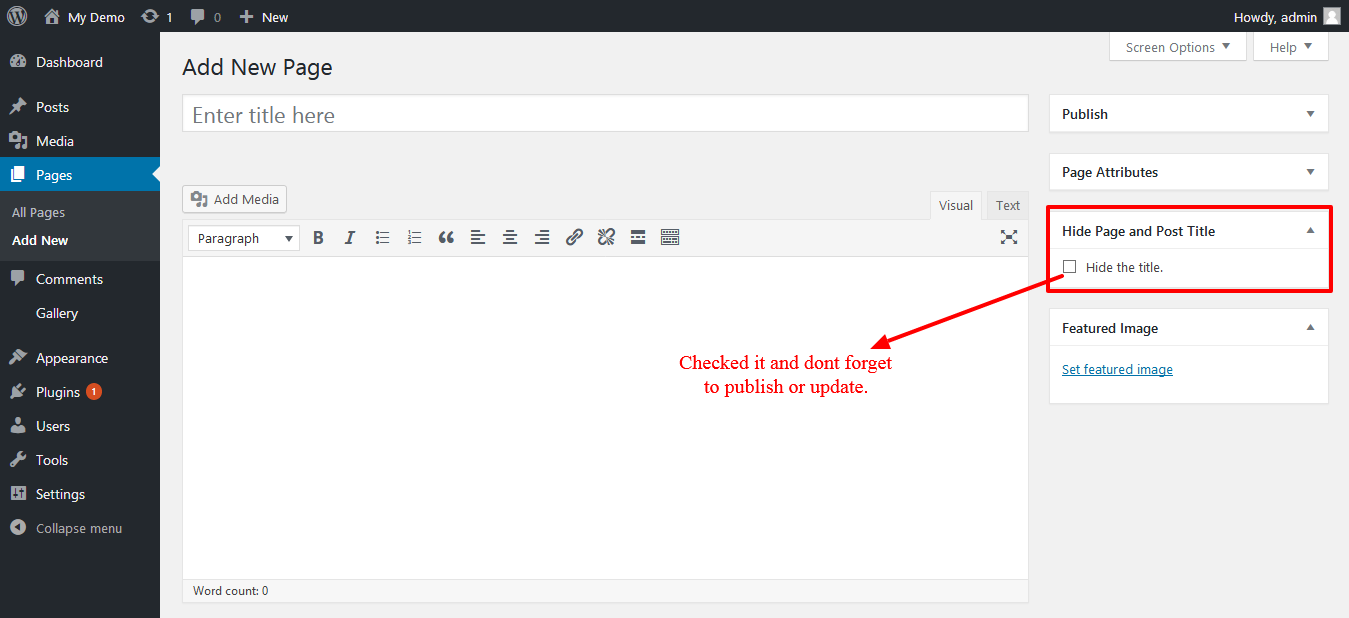
Simply enable the “Hide the title” option when editing the content. The setting is applied individually, so you can choose which pages, posts or custom post types should display their title.
Key Features
Enjoying the Plugin?
Enjoying the plugin? Please consider giving a review. Your feedback helps us improve the plugin and helps other WordPress users discover it.
The opening of the plugin's own description. The full text, installation notes and changelog are on its WordPress.org page.
Yes. The plugin supports WordPress block themes as well as classic themes.
The plugin only hides the visible title on the page. It does not delete or change the title stored for the page or post, and it does not intentionally modify the document title or SEO metadata.
If the hidden title is the only H1 on your page, consider adding another appropriate heading to your content when needed.
Yes. The plugin supports public custom post types (CPT).
Edit the page, post or custom post type, uncheck “Hide the title”, and update the content.
Go back to the specific page, post or custom post type where you want to hide the title and confirm that “Hide the title” is checked. Then click Update or Publish and check the page again.
The title-hiding option is set individually for each page, post or custom post type.
#600 by installs
Gives you the ability to hide the title of any post, page or custom post type item without affecting menus or titles in the admin area.
Read from the WordPress.org plugin API on , when WordPress 7.1.4 was the current release. WordPress.org rounds active installs into buckets. These are the directory's figures, not my verdict, and I haven't tested this plugin.